


To add RAG to an ASP.NET Core API, you need four things. The first is a place to store your documents as searchable chunks, and the second is a way to find the chunks that match a question. You also need a language model that writes the answer from those chunks, and a store for the conversation so that the API still remembers it after a restart.
In this article, I will build all four in a .NET 10 Minimal API using GoodMem, and I will measure what a reranker changes on 28 real questions.
If you have built a chatbot demo before, you have probably seen this situation. The demo answers follow-up questions well while the application is running, but once you restart it, the bot has no idea what you are talking about. The answers also come without sources, so you cannot tell whether the model read your documents or made something up.
By the end of this article, you will have a chat endpoint that answers questions over a folder of Markdown files and returns the articles that it retrieved for the answer as citations. It will also remember each user’s conversation across restarts, and it will keep one user’s conversation away from every other user.
I built this on .NET 10 with the GoodMem .NET SDK, running GoodMem locally in Docker. I started on version 2.0.5, and 2.0.6 came out while I was writing this. I moved the sample to 2.0.6 without changing any code and ran the measurements again, so all the numbers in this article are from 2.0.6.
You can get the complete source code of this implementation on my GitHub repository here. It includes the 19 articles I used as the knowledge base, the 28 test questions, and the eval endpoint that produced the reranker numbers you will see below.
What is RAG, and how is it different from chat memory?
RAG stands for Retrieval-Augmented Generation, which means that before the language model answers a question, your application first searches your own documents for the most relevant passages and passes them to the model along with the question.
The model then writes its answer from those passages. This is why it can answer questions about content it was never trained on, and why it can tell you which documents the answer came from.
People often mix up RAG with chat memory, so let me separate the two first. The Microsoft Agent Framework documentation lists a few common context patterns, and these three are the ones that are easy to confuse.
| Pattern | What it stores | What it is used for |
|---|---|---|
| Conversation storage | The exact messages of a conversation | Continuing the same chat later |
| Memory | Selected knowledge from earlier interactions | Recalling what a user said days or weeks ago |
| RAG | An external knowledge source, like your documents | Answering questions from content the model does not know |
The API in this article covers all three in a simple way. The documents are the knowledge source, every turn is stored in full so that it can be found again by meaning, which is a basic form of memory, and the last few turns go along with each request.
There are two more terms that you will see throughout the article, so let me explain them here. An embedding is a list of numbers that represents the meaning of a piece of text, so two passages about the same topic end up close to each other even when the words differ.
A chunk is a small piece of a document, and documents are split into chunks before embedding because a search over small pieces is more precise.
What is a reranker, and why do I use one here?
A vector search is fast because it compares the embedding of your question with the embeddings of the chunks, and those were calculated separately. This means that the search finds chunks that are about the same topic, but it never reads the question and a chunk side by side to check whether the chunk really answers it.
A reranker is a second model that does this check. It takes the question and each chunk that the search returned, reads them together, and gives every chunk a score for how well it answers the question. The chunks are then sorted again by that score. Voyage describes its rerankers as cross-encoders that jointly process a pair of query and document.
Think of it like hiring, where the vector search is the quick filter that shortlists 20 resumes out of thousands, and the reranker is the interviewer who talks to those 20 people and decides who fits the role best.
Reading every pair takes time, so a reranker only works on the small set that the vector search returns, which is 20 chunks in this API.
I added one here because a few of my 19 articles are close to each other in topic. There are two articles on caching and three on authentication, so the search can find the right topic and still put the wrong article first. This matters because the order decides which chunks the model gets, and with the reranker on, only the top five results are passed to the model.
In GoodMem, the reranker is one more ID on the request, so I made it an option on the chat endpoint and measured what it changed. You will see those numbers later in the article.
What is GoodMem?
GoodMem is a memory and retrieval server for AI applications. You run it as a Docker container next to a PostgreSQL database, and your application talks to it over REST or gRPC. It takes care of chunking your documents, creating the embeddings, searching them, reranking the results, and calling the language model to write the answer.
There are only a few concepts that you need to know before writing code.
- Space - A container for related content, configured with an embedding model and a chunking strategy. Every piece of content belongs to one space.
- Memory - One document that you store in a space. It can be a Markdown file, a PDF, or a short piece of text like a chat turn. GoodMem keeps the original content, splits it into chunks, and embeds each chunk.
- Embedder, LLM and reranker - The three kinds of models that GoodMem can call for you. You register each one once with its API key, and after that you refer to it by its ID.
- Retrieve - The single request that does the search and writes the answer. You send a question, and GoodMem streams back the matching chunks followed by an answer written by the LLM. Without a server like this, you would embed the question, search the vectors, rerank the results and call the LLM yourself.
How much does GoodMem cost?
The self-hosted version of GoodMem is free, and that includes commercial use. The server is proprietary software that is distributed as a binary, which means that it is closed source, while the client SDKs are open source under the Apache-2.0 license.
GoodMem Cloud, the hosted version, starts at 15 USD per month and has a 14-day free trial that does not ask for a credit card. You can check the current numbers on the GoodMem pricing page .
Keep in mind that GoodMem does not include the models themselves. I use OpenAI for the embeddings and the answers and Voyage AI for the reranker, and you pay those two providers separately.
Do you need a memory layer at all?
Before installing anything, it is worth asking whether you need a separate server for this. .NET 10 already has good building blocks in Microsoft.Extensions.AI, Microsoft.Extensions.VectorData and the Microsoft Agent Framework. All three are generally available.
These packages give you the parts, so here is what you still build and own when you go that way, and what you take on with a separate server.
| Concern | With the Microsoft building blocks | With a memory layer like GoodMem |
|---|---|---|
| Chunking and embedding | You write the ingestion pipeline | Done by the server when you upload a file |
| Vector storage | You pick and run a vector store | PostgreSQL with pgvector, bundled |
| Reranking | There is no abstraction for it yet, so you call a reranker API yourself | One ID on the request |
| Chat history across restarts | The default history is in memory, so you persist the session yourself | Stored in PostgreSQL |
| Per-user scoping and deletion | You add a filter to every query and write the delete | A metadata filter on the request |
| Source and integration | Open source packages that work with Microsoft.Extensions.AI and the Agent Framework | A closed-source server and one more service to run, with no Microsoft.Extensions.AI integration |
The Agent Framework documentation says this plainly about restarts: “Persist the full session object, not only message text.”
Here is how I would decide between the two. If your knowledge base is small, you may not need retrieval at all. Anthropic’s guidance is that a knowledge base under 200,000 tokens, which is about 500 pages, can simply be included in the prompt.
A memory layer starts to make sense when you have many users, documents that keep changing, and requirements like reranking and per-user memory, because those are the parts that take the most time to build well.
What I will build
The API has four endpoints, and I will go through them once GoodMem is running locally. I show the code of the chat endpoint in full, and the other three are short and are in the repository.
| Endpoint | Auth | What it does |
|---|---|---|
POST /api/setup | None | Registers the models, creates the space, ingests the documents |
POST /api/chat | X-Api-Key | Answers a question with citations and remembers the turn |
DELETE /api/memory | X-Api-Key | Deletes the caller’s conversation memory |
POST /api/eval | None | Runs the test questions with and without the reranker |
Prerequisites
As usual, ensure that you have the following installed and ready.
- .NET 10 SDK
- Docker Desktop
- An OpenAI API key, for the embeddings and the answers
- A Voyage AI API key, only if you want to try the reranker
- Visual Studio, VS Code, or any editor of your choice
Running GoodMem locally
You can get a GoodMem server in two ways. The first one is to install it locally with Docker, which is what I used for everything that I measured in this article. The second one is GoodMem Cloud, which gives you a hosted instance, and I cover it in a separate section later in the article.
If you are on Windows and you want to skip the installer steps below, the Cloud option is the quicker way to get a server.
GoodMem installs through its own CLI, which pulls two Docker images and starts them with Docker Compose. One is the GoodMem server, and the other is a PostgreSQL 17 database with the pgvector extension. The quick start gives you a one-line installer, and the --handsfree flag makes it run without asking any questions. I only ran it on Windows, where it needs the extra steps in the next section.
curl -s https://get.goodmem.ai | bash -s -- --handsfree --db-password "your-password-min-14-chars" --tls-disabledThe --tls-disabled flag is meant for local development. By default, GoodMem serves HTTPS with a self-signed certificate that is regenerated on every restart, and with this flag the server listens on plain http://localhost:8080.
Installing on Windows without WSL
The quick start page says that Windows users should install through WSL, and I did not test that path. I am on Windows 11 with Docker Desktop, and the native Windows build of the GoodMem CLI worked for me without WSL.
I had to download the CLI and the cosign binary by hand first, because the installer failed on both of them, and the exact steps are in the README of the repository. After that, this command installed GoodMem and reported that the image provenance was verified.
goodmem system install --handsfree --skip-docker-install --tls-disabled --profile-name ragchat --db-password "your-password-min-14-chars"The installer first prints the steps that it is going to run, and then goes through them one by one.
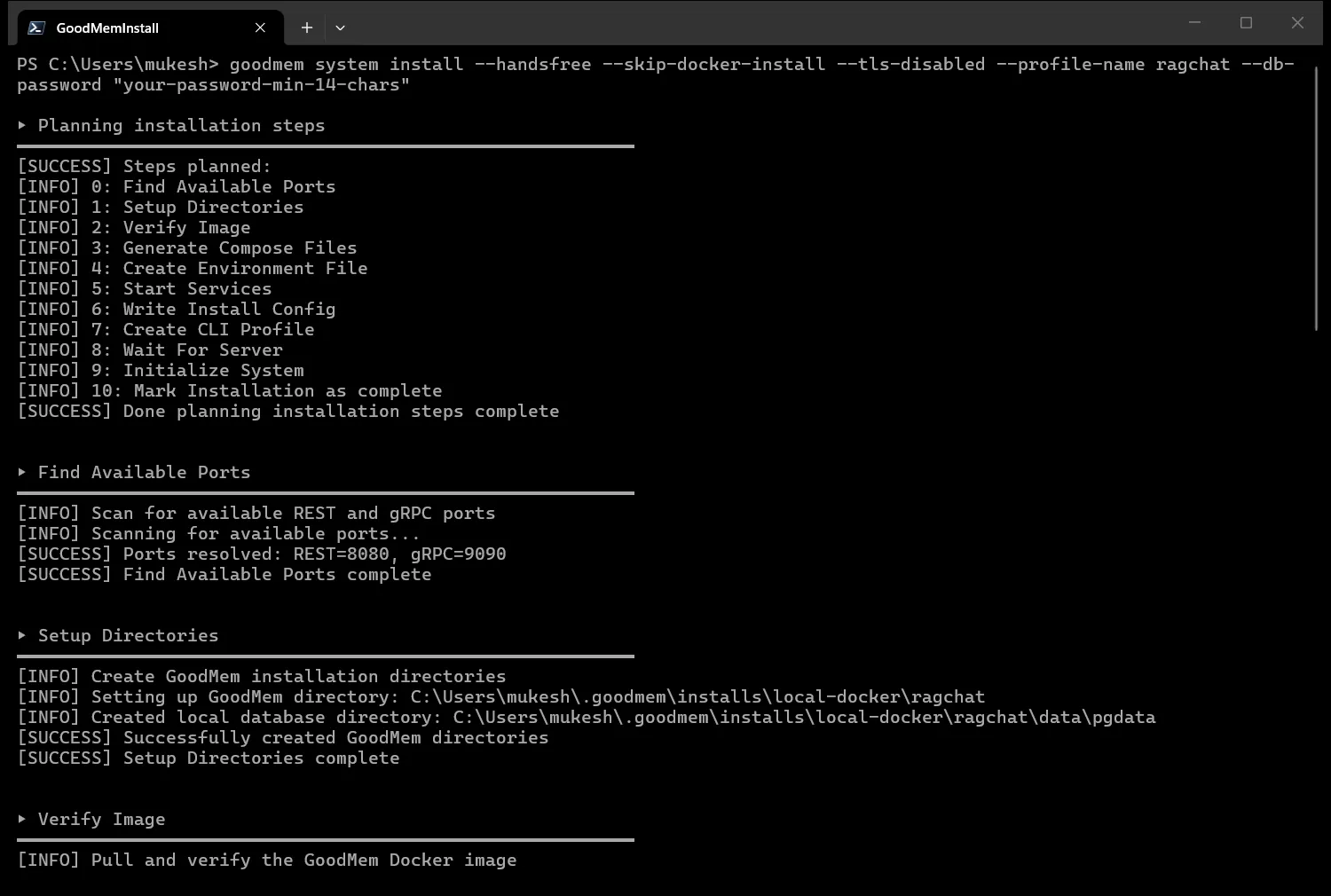
A little further down in the same output, you can see that the image was pulled, its provenance was verified, and the services were started with Docker Compose.
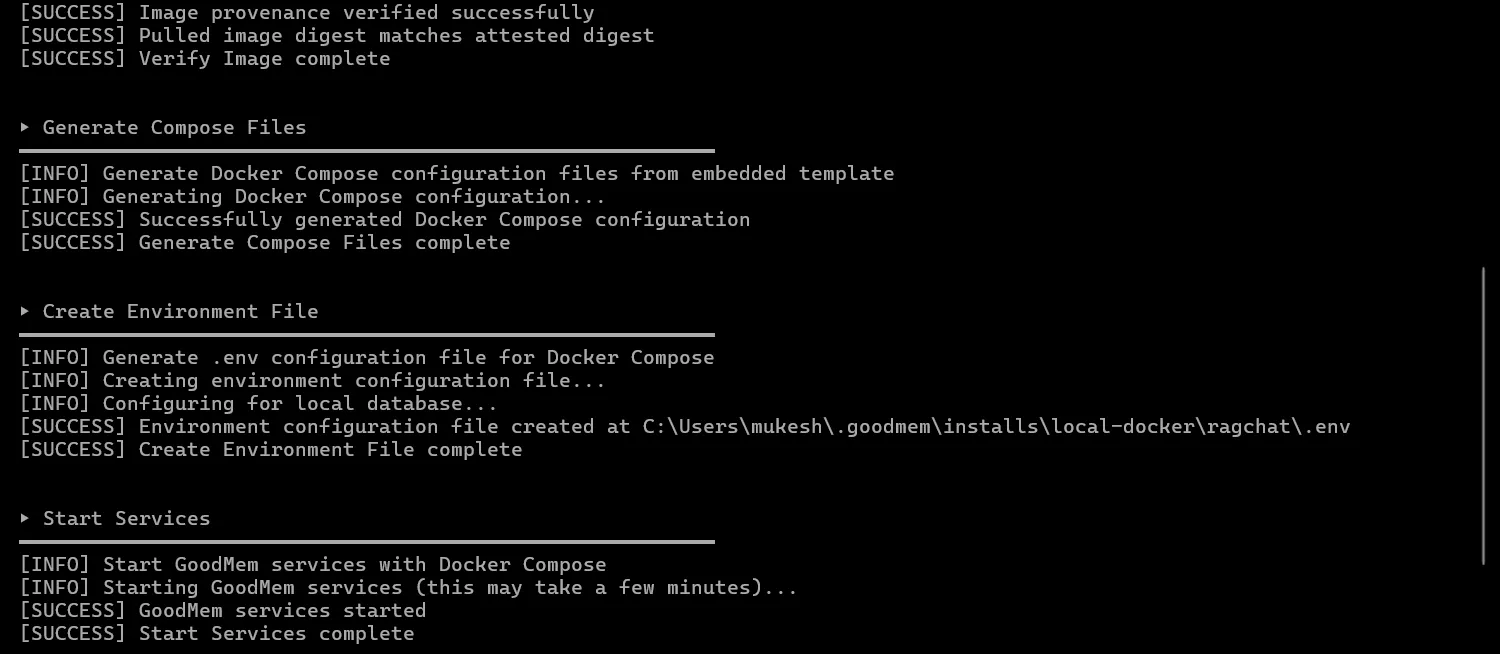
There is also a --skip-verify flag that gets past the cosign problem, but it turns off the signature check, so I would not recommend it.
What you get after the install
Once the install finishes, two containers are running, which in my case are goodmem-ragchat-server and goodmem-ragchat-db because I named the profile ragchat. The installer prints the address of the web console, which is http://localhost:8080/console, the server URL for gRPC, which is http://localhost:9090, and an API key that starts with gm_.
The REST API that the .NET client talks to is on the same port as the console, at http://localhost:8080.
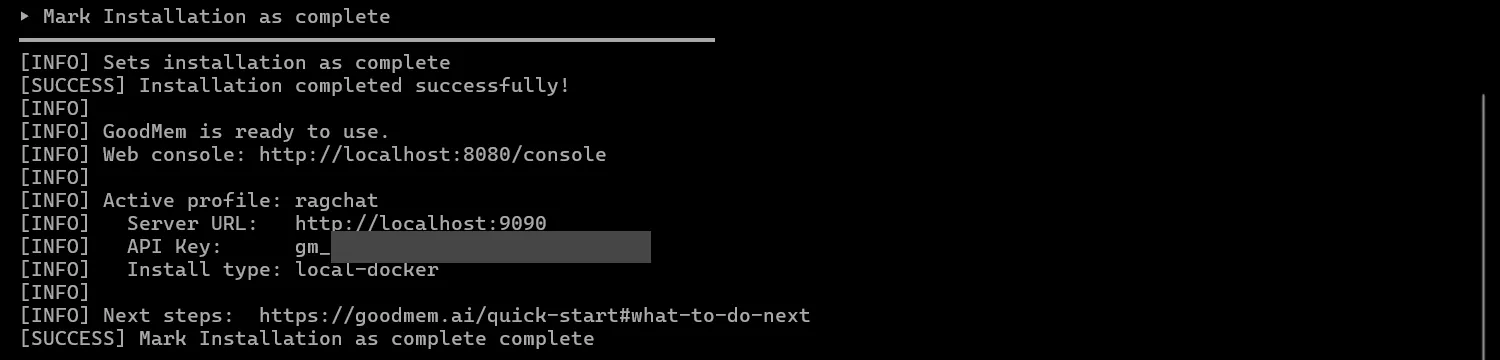
You can confirm that the server is ready by calling its readiness endpoint, which returns a 200 status code. I have covered how to add the same kind of check to your own API in my guide on health checks in ASP.NET Core.
curl http://localhost:8080/readyzOpen the console and paste your API key to sign in. Once the setup has run from code, you can come back here to see the registered models, browse the ingested documents and try a search by hand.
Docker Guide for .NET 10 Developers
If Docker is new to you, this guide covers images, containers, Docker Compose and the commands used in this article.
Creating the .NET 10 project
The snippets in this article are excerpts from the sample, so the quickest way to follow along is to clone the repository and run it. The sample listens on port 5162, which comes from its launch profile, so a project that you create yourself will get a different port.
Let’s create the solution in the newer .slnx format, and then add the API project to it.
dotnet new sln -n RagChat --format slnxdotnet new webapi -n RagChat.Apidotnet sln RagChat.slnx add RagChat.ApiNext, let’s install the packages. The first one is the official GoodMem .NET client, and the other two are for the OpenAPI document and the Scalar UI that I use for testing.
dotnet add RagChat.Api package PairSystems.Goodmem.Client --version 2.0.6dotnet add RagChat.Api package Microsoft.AspNetCore.OpenApi --version 10.0.12dotnet add RagChat.Api package Scalar.AspNetCore --version 2.17.12The GoodMem client targets both .NET 8 and .NET 10, and it has no third-party dependencies. I pinned version 2.0.6 because the package moved from 1.x to 2.0 in July 2026, so samples written for 1.x may not work as they are.
Storing the keys in user secrets
The API needs up to three keys, since the Voyage key is optional, and none of them should be in appsettings.json, so I keep them in user secrets during development.
dotnet user-secrets init --project RagChat.Apidotnet user-secrets set "GoodMem:ApiKey" "<your GoodMem key>" --project RagChat.Apidotnet user-secrets set "GoodMem:OpenAiApiKey" "<your OpenAI key>" --project RagChat.Apidotnet user-secrets set "GoodMem:VoyageApiKey" "<your Voyage key>" --project RagChat.ApiThe settings that are safe to commit go into appsettings.json.
{ "GoodMem": { "BaseUrl": "http://localhost:8080", "EmbeddingModel": "text-embedding-3-small", "ChatModel": "gpt-5-mini", "RerankModel": "rerank-2.5", "Timeout": "00:02:00" }}If you want to understand how these sources are layered, I have a separate article on configuration, environment variables and user secrets in ASP.NET Core.
Binding the settings with the Options pattern
I bind this section to a class and validate it when the application starts, so a missing key stops the application at startup with a clear message.
public sealed class GoodMemOptions{    public const string SectionName = "GoodMem";
    [Required, Url]    public string BaseUrl { get; set; } = string.Empty;
    [Required]    public string ApiKey { get; set; } = string.Empty;
    [Required]    public string OpenAiApiKey { get; set; } = string.Empty;
    // Optional. Without it the API still works, just without reranking.    public string? VoyageApiKey { get; set; }
    public string EmbeddingModel { get; set; } = "text-embedding-3-small";
    public string ChatModel { get; set; } = "gpt-5-mini";
    public string RerankModel { get; set; } = "rerank-2.5";
    // The SDK waits forever by default, so always set a timeout. On a streamed call this only covers    // the wait for the response headers, so ChatService also uses it as the deadline for a whole chat request.    public TimeSpan Timeout { get; set; } = TimeSpan.FromMinutes(2);}
One gotcha worth knowing is the timeout of the SDK. When the SDK creates its own HttpClient, the default timeout is infinite, so a request to a slow model can hang for as long as the model takes, which is why I set it to two minutes here.
Keep in mind that this timeout only covers the wait for the response headers. The retrieve call is read as a stream, and the answer arrives after the headers, so the timeout does not limit how long the full answer can take. To check this, I set the timeout to two seconds and sent three chat requests, and all three still returned a 200 after 9 to 14 seconds.
For this reason, the sample also uses the same value as a deadline for the whole chat request, and I show that in the AskAsync method later.
Registering the client
Here is how the registration looks in Program.cs.
builder.Services.AddOptions<GoodMemOptions>()    .BindConfiguration(GoodMemOptions.SectionName)    .ValidateDataAnnotations()    .ValidateOnStart();
// GoodmemClient is thread-safe and holds its own HttpClient, so one instance for the app.builder.Services.AddSingleton(sp =>{    var options = sp.GetRequiredService<IOptions<GoodMemOptions>>().Value;    return new GoodmemClient(new GoodmemClientOptions    {        BaseUrl = options.BaseUrl,        ApiKey = options.ApiKey,        Timeout = options.Timeout    });});builder.Services.AddSingleton<GoodMemSetup>();builder.Services.AddSingleton<ChatService>();builder.Services.AddSingleton<EvalService>();
The SDK does not ship a dependency injection extension, so I register GoodmemClient myself as a singleton. If the reasoning behind that lifetime is not clear, my article on singleton, scoped and transient lifetimes explains it, and the Options pattern guide covers ValidateOnStart in detail.
Registering the models and creating the space
The setup code is in a GoodMemSetup class in GoodMem/GoodMemSetup.cs, which gets the GoodMem client, the options, the host environment and a logger through its constructor. GoodMem needs to know which models to use before it can store anything. You register an embedder, an LLM and a reranker, and then you create a space that uses the embedder.
Normally, each of these calls returns a new ID that you would have to save somewhere. GoodMem also lets you choose the ID yourself, so I fixed the four IDs in a static class.
public static class GoodMemIds{ public const string Embedder = "002101f5-5811-4dac-9245-f653486e41cf"; public const string Llm = "37ec67af-edcb-485d-86e2-dcbde9a675e4"; public const string Reranker = "e69097f3-e919-4b4e-84a8-787da4006f60"; public const string Space = "72b51942-f891-42de-a35d-daf3f08d46ef";}Because the IDs never change, the setup can run any number of times. When a resource already exists, GoodMem returns a 409 Conflict, the SDK throws a ConflictException, and I treat that as a sign that the resource is already there.
Keep in mind that this makes the setup create-if-absent. A conflict only tells you that the ID is taken, and GoodMem leaves the existing resource as it is. So if you change a model name or a provider key later, or edit one of the Markdown files, a second run of the setup will not pick up the change, and you have to update that resource or ingest that file again yourself.
private async Task CreateIfMissingAsync<T>(string resource, Func<Task<T>> create){ try { await create(); logger.LogInformation("Created the GoodMem {Resource}", resource); } catch (ConflictException) { logger.LogInformation("The GoodMem {Resource} already exists", resource); }}With that helper, the setup is four create calls followed by the ingestion.
public async Task<SetupResult> RunAsync(CancellationToken cancellationToken){    await CreateIfMissingAsync("embedder", () => client.Embedders.CreateAsync(        new EmbedderCreationRequest        {            EmbedderId = GoodMemIds.Embedder,            DisplayName = "RagChat embedder",            ModelIdentifier = _options.EmbeddingModel        },        _options.OpenAiApiKey,        cancellationToken));
    await CreateIfMissingAsync("LLM", () => client.Llms.CreateAsync(        new LlmCreationRequest        {            LlmId = GoodMemIds.Llm,            DisplayName = "RagChat LLM",            ModelIdentifier = _options.ChatModel        },        _options.OpenAiApiKey,        cancellationToken));
    var rerankerEnabled = !string.IsNullOrWhiteSpace(_options.VoyageApiKey);    if (rerankerEnabled)    {        await CreateIfMissingAsync("reranker", () => client.Rerankers.CreateAsync(            new RerankerCreationRequest            {                RerankerId = GoodMemIds.Reranker,                DisplayName = "RagChat reranker",                ModelIdentifier = _options.RerankModel            },            _options.VoyageApiKey,            cancellationToken));    }
    await CreateIfMissingAsync("space", () => client.Spaces.CreateAsync(        new SpaceCreationRequest        {            SpaceId = GoodMemIds.Space,            Name = "ragchat",            SpaceEmbedders = [new SpaceEmbedderConfig { EmbedderId = GoodMemIds.Embedder, DefaultRetrievalWeight = 1 }]        },        cancellationToken));
    var (ingested, skipped) = await IngestDocumentsAsync(cancellationToken);    return new SetupResult(ingested, skipped, rerankerEnabled);}
You only pass the model name, like text-embedding-3-small or rerank-2.5, and GoodMem fills in the provider and the endpoint for the common OpenAI and Voyage models. The reranker is optional, and the API works without it when no Voyage key is configured.
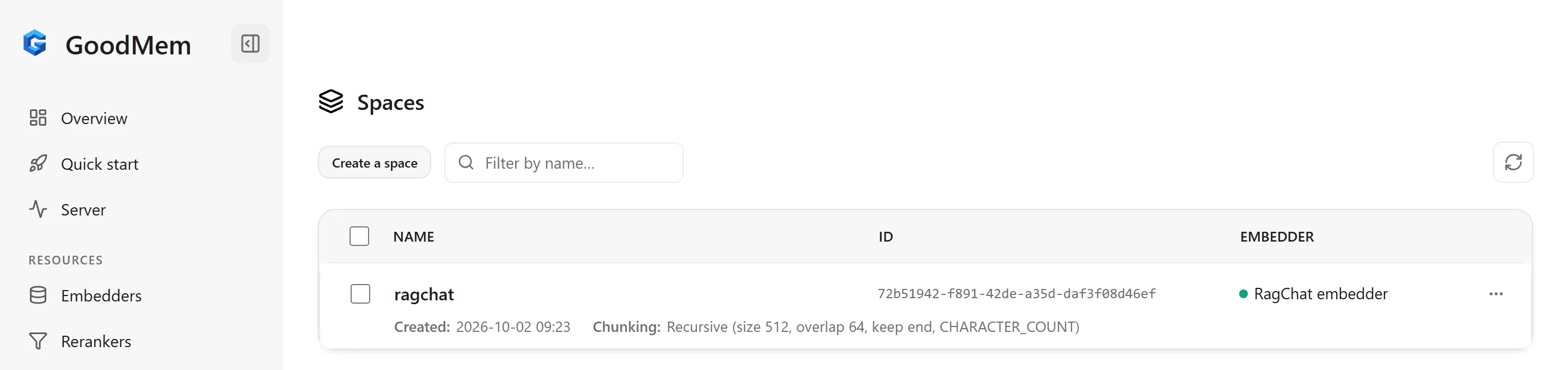
I did not set a chunking strategy on the space, so the default applies, which is recursive chunking at 512 characters per chunk with an overlap of 64 characters. Keep in mind that the embedder and the default chunking configuration of a space cannot be changed after the space is created.
You can still use a different chunk size without a new space, because a single memory can carry its own chunking configuration through the ChunkingConfig property of JsonMemoryCreationRequest, and it overrides the default of the space for that memory. When I sent the same text twice to the REST API, the default gave 8 chunks and an override of 128 characters gave 29. Content that is already ingested keeps its chunks, so it has to be ingested again to be chunked differently.
You can see the same values on the Spaces page of the console.
Ingesting the documents
For the knowledge base, I used 19 of my own published .NET 10 articles as Markdown files in a Documents folder. I did not want to use a few tiny files for this, because they are too small to show how retrieval behaves, and I know these articles well enough to judge the answers.
private async Task<(int Ingested, int Skipped)> IngestDocumentsAsync(CancellationToken cancellationToken){    var folder = Path.Combine(environment.ContentRootPath, "Documents");    var pending = new List<string>();    var existing = new List<string>();
    foreach (var path in Directory.EnumerateFiles(folder, "*.md"))    {        var slug = Path.GetFileNameWithoutExtension(path);        var title = File.ReadLines(path).First().TrimStart('#', ' ');
        try        {            var memory = await client.Memories.CreateFromFileAsync(                GoodMemIds.Space,                path,                new JsonMemoryCreationRequest                {                    SpaceId = GoodMemIds.Space,                    MemoryId = DocumentId(slug),                    Metadata = new Dictionary<string, object>                    {                        ["kind"] = "document",                        ["title"] = title,                        ["url"] = $"https://codewithmukesh.com/blog/{slug}/"                    }                },                cancellationToken);
            pending.Add(memory.MemoryId);        }        catch (ConflictException)        {            // The ID is already taken. That alone does not say the earlier ingestion finished,            // so the existing memory is checked below before it counts as skipped.            existing.Add(DocumentId(slug));        }    }
    // Ingestion is asynchronous. GoodMem accepts the file right away, then chunks    // and embeds it in the background, so wait until every document is searchable.    // This throws if any document, new or existing, ended in the FAILED state.    await Task.WhenAll(pending.Concat(existing).Select(id => WaitUntilProcessedAsync(id, cancellationToken)));    return (pending.Count, existing.Count);}
Let me explain a few things in this method. Every document gets some metadata attached to it, where the kind is document, which I use later to tell documents apart from conversation turns, and the title and url are what the API returns as citations.
The memory ID is a GUID built from an MD5 hash of the file name without its extension, so the same file always maps to the same ID, and a second run of the setup gets a conflict for it. MD5 is fine here because the ID is only a stable identifier.
A conflict does not tell me whether the earlier ingestion finished, so I keep the ID in the existing list and check its status together with the new documents before it is counted as skipped. If one of them ended in the failed state, the setup throws. This only reports a failed document, and repairing it is still up to you.
public static string DocumentId(string slug) => new Guid(MD5.HashData(Encoding.UTF8.GetBytes(slug))).ToString();The ingestion is also asynchronous, which means that CreateFromFileAsync returns as soon as GoodMem has accepted the file, and the chunking and embedding continue in the background. The .NET SDK does not have a helper that waits for this, so I wrote a small polling loop with a timeout and a branch for the failed state.
public async Task WaitUntilProcessedAsync(string memoryId, CancellationToken cancellationToken){    using var timeout = CancellationTokenSource.CreateLinkedTokenSource(cancellationToken);    timeout.CancelAfter(TimeSpan.FromMinutes(5));
    while (true)    {        var memory = await client.Memories.GetAsync(memoryId, ct: timeout.Token);        switch (memory.ProcessingStatus)        {            case "COMPLETED":                return;            case "FAILED":                throw new InvalidOperationException($"GoodMem could not process memory {memoryId}.");        }
        await Task.Delay(TimeSpan.FromSeconds(1), timeout.Token);    }}
Now run the API and call the setup endpoint, which only calls RunAsync and returns its result.
dotnet run --project RagChat.Api --launch-profile httpcurl -X POST http://localhost:5162/api/setupOn my machine, the first call ingested all 19 articles and returned in about 10 seconds.
{ "documentsIngested": 19, "documentsSkipped": 0, "rerankerEnabled": true }When I called it a second time, nothing was created again, and all 19 documents were skipped.
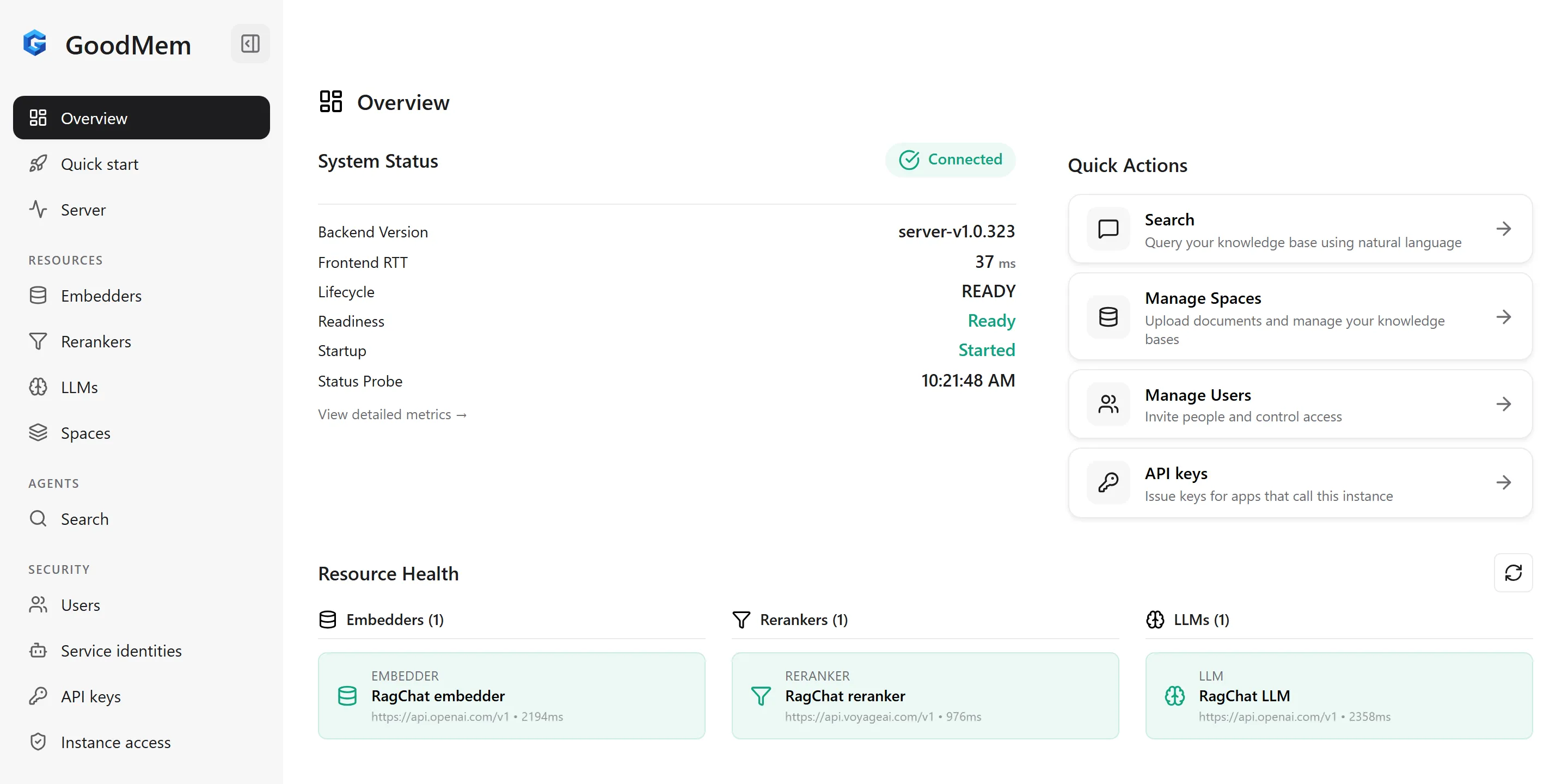
{ "documentsIngested": 0, "documentsSkipped": 19, "rerankerEnabled": true }If you open the console now, the overview page shows the three models that the setup registered.
Building the chat endpoint with citations
Now let’s build the main part of the API, which is the chat endpoint. It is a Minimal API endpoint that takes a question and a flag that turns the reranker on or off.
public sealed record ChatRequest(string Question, bool UseReranker = false);The mapping is inside a MapChatEndpoints extension method in ChatEndpoints.cs, which Program.cs calls.
var chat = app.MapGroup("/api").RequireAuthorization();
chat.MapPost("/chat", async (ChatRequest request, ClaimsPrincipal user, ChatService chatService, CancellationToken ct) =>{    if (string.IsNullOrWhiteSpace(request.Question))    {        return Results.ValidationProblem(new Dictionary<string, string[]>        {            [nameof(ChatRequest.Question)] = ["A question is required."]        });    }
    var answer = await chatService.AskAsync(UserId(user), request.Question, request.UseReranker, ct);    return Results.Ok(answer);});
Notice that the request has no user ID and no session ID, because the user comes from the authenticated caller. The endpoint group requires authorization, and the sample has a small API key handler with two demo keys, alice-demo-key and bob-demo-key, which are defined in appsettings.Development.json. I come back to this in the section on keeping users apart.
Sending the retrieve request
The SDK has a simple RetrieveAsync method that takes a question and a few options. It is the right choice for a first test, but it does not let you pass a metadata filter or the previous conversation. This sample keeps the documents and the turns of every user in one space, so it needs the filter to keep the users apart and the context for the recent turns.
If you give every user a space of their own for the conversation, RetrieveAsync can take several space IDs and you would not need the filter, but it still has no way to pass the context.
So I use RetrieveRawAsync, which takes the full request, and I build that request in a small BuildRequest method. It is part of the ChatService class in GoodMem/ChatService.cs, which also has the other methods that I show in this section and the next two.
private static RetrieveMemoryRequest BuildRequest(string userId, string question, List<string> recentTurns, bool useReranker){    var config = new Dictionary<string, object>    {        ["llm_id"] = GoodMemIds.Llm,        ["sys_prompt"] = SystemPrompt,        ["prompt"] = UserPrompt,        ["gen_token_budget"] = 2048,        ["max_results"] = 5    };    if (useReranker)    {        config["reranker_id"] = GoodMemIds.Reranker;    }
    var request = new RetrieveMemoryRequest    {        Message = question,        // The last few turns go in as context, so "what did I just ask?" always works.        Context = recentTurns.Select(ContextItem.OfText).ToList(),        SpaceKeys = [new SpaceKey { SpaceId = GoodMemIds.Space, Filter = DocumentsAndOwnHistory(userId) }],        RequestedSize = 20,        PostProcessor = new PostProcessor { Name = ChatPostProcessor, Config = config }    };
    return request;}
SpaceKeys carries the filter that limits each user to the documents and their own conversation, RequestedSize is the number of chunks to fetch from the vector search, and PostProcessor is the step that runs after the search, where the reranker and the LLM are configured.
The sys_prompt and prompt keys carry my own prompts. My first version did not have them, and I explain why they are needed in the section on conversation memory. Note that max_results only applies after a rerank, so a request without the reranker passes all 20 chunks to the model, and I come back to this in the production notes.
The post-processor is selected by a Java class name, com.goodmem.retrieval.postprocess.ChatPostProcessorFactory, which is the ChatPostProcessor constant in the sample. Its settings are a dictionary with snake_case keys like llm_id and reranker_id, so a typo in a key is only found at runtime. This is the part of the SDK that feels the least like .NET to me.
The gen_token_budget key is the maximum number of tokens for the answer. It falls back to 512 when the LLM has no token limit configured, which is low for a reasoning model that also spends tokens on thinking, so I raised it to 2048.
Keep in mind that even 2048 can run out with a reasoning model. In one of my later test requests, gpt-5-mini used the whole budget on reasoning and returned no text, and GoodMem reported it with the SUMMARIZATION_FAILED code, so I would raise the budget further if you see that code often.
Reading the streamed response
RetrieveRawAsync returns an IAsyncEnumerable of events, and they arrive in this order: a boundary event that marks the start of a result set, then the memories and their chunks, then a boundary event for the end, and finally the answer from the LLM.
private static async Task<ChatAnswer> ReadAnswerAsync(IAsyncEnumerable<RetrieveMemoryEvent> events, bool useReranker){    var stages = new Dictionary<string, string>();    var memories = new Dictionary<string, Memory>();    var chunks = new List<ChunkReference>();    AbstractReply? reply = null;
    await foreach (var evt in events)    {        if (evt.Status is { Code: "RERANKING_FAILED" or "SUMMARIZATION_FAILED" } status)        {            throw new InvalidOperationException($"GoodMem retrieval failed: {status.Code}");        }
        if (evt.ResultSetBoundary is { Kind: "BEGIN" } boundary)        {            stages[boundary.ResultSetId] = boundary.StageName;        }
        if (evt.MemoryDefinition is { } memory)        {            memories[memory.MemoryId] = memory;        }
        if (evt.RetrievedItem?.Chunk is { } chunk)        {            chunks.Add(chunk);        }
        if (evt.AbstractReply is { Text.Length: > 0 } abstractReply)        {            reply = abstractReply;        }    }
    if (reply?.ResultSetId is not { } resultSetId)    {        throw new InvalidOperationException("GoodMem did not return an answer.");    }
    // If the reranker fails, GoodMem falls back to plain vector results without failing the request.    // The status check above catches that. The stage name confirms the rerank stage produced the results.    var reranked = stages.GetValueOrDefault(resultSetId) == "rerank";    if (useReranker && !reranked)    {        throw new InvalidOperationException("The reranker was requested but did not run.");    }
    var citations = chunks        .Where(c => c.ResultSetId == resultSetId)        .DistinctBy(c => c.Chunk.MemoryId)        .Select(c =>        {            memories.TryGetValue(c.Chunk.MemoryId, out var memory);            return new Citation(                Metadata(memory, "title") ?? "Untitled",                Metadata(memory, "url"),                c.Chunk.ChunkText.Length > 200 ? c.Chunk.ChunkText[..200] + "..." : c.Chunk.ChunkText);        })        .ToList();
    return new ChatAnswer(reply.Text, reranked, citations, 0);}
Each chunk carries the ID of the memory it belongs to, and each memory carries the metadata that I attached during ingestion, so for every distinct memory in the result I return its title, its URL and a short excerpt as a citation.
The Metadata helper in the sample reads a value from that metadata, which comes back as a JsonElement. Note that these are the sources that were retrieved for the answer, so a citation can also be an article that the model read and did not use.
There are two checks for the reranker in this method, and I would keep both of them. When the reranker failed in my tests, GoodMem sent a status event with the code RERANKING_FAILED, fell back to the plain vector results, and continued. That is a sensible default for a chat application, but it also means that your application can believe it is reranking when it is not, unless it reads the status events.
So the method throws when it sees that status event, or the SUMMARIZATION_FAILED code. It also looks at the stage name of the result set, which on my machine was retrieve for a plain search and rerank when the reranker ran, and it throws if a requested rerank did not happen.
Here is a question and the response, with the answer shortened.
curl -X POST http://localhost:5162/api/chat \ -H "X-Api-Key: alice-demo-key" \ -H "Content-Type: application/json" \ -d '{ "question": "How do I validate options at startup in ASP.NET Core?", "useReranker": true }'{ "answer": "Use eager startup validation by registering and validating your options, for example: builder.Services.AddOptions<WeatherOptions>().BindConfiguration(WeatherOptions.SectionName).ValidateDataAnnotations().ValidateOnStart(); ...", "reranked": true, "citations": [ { "title": "Options Pattern in ASP.NET Core - IOptions vs Snapshot vs Monitor", "url": "https://codewithmukesh.com/blog/options-pattern-in-aspnet-core/", "excerpt": "According to [Microsoft's configuration documentation](https://learn.microsoft.com/en-us/aspnet/core/fundamentals/configuration/?view=aspnetcore-10.0), eager validation ensures configuration errors ..." } ], "elapsedMs": 14381}This response took about 14 seconds, and in my runs a single chat call took between about 3 and 14 seconds, and almost all of that time was the model writing the answer.
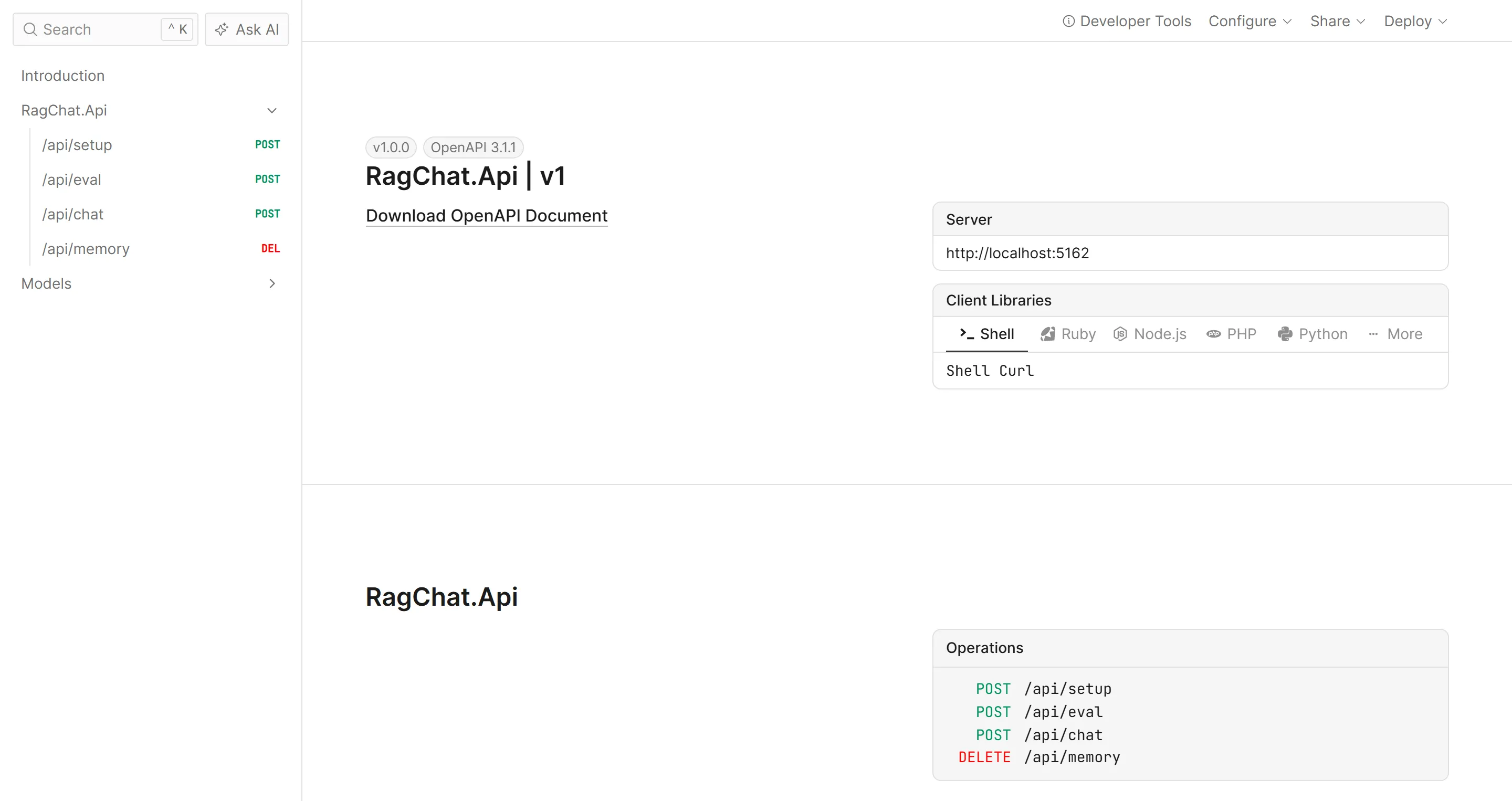
You can try the same request from the Scalar UI at /scalar. I have covered why Swagger was dropped and what replaced it in a separate article.
How does the API remember the conversation?
So far, the API only answers single questions, and to make it remember, I do two things on every request. After the answer is written, I store the question and the answer as a new memory that belongs to the user. Before the next question is sent, I load the user’s most recent turns and pass them along with the request.
Let’s first look at the method that stores a turn.
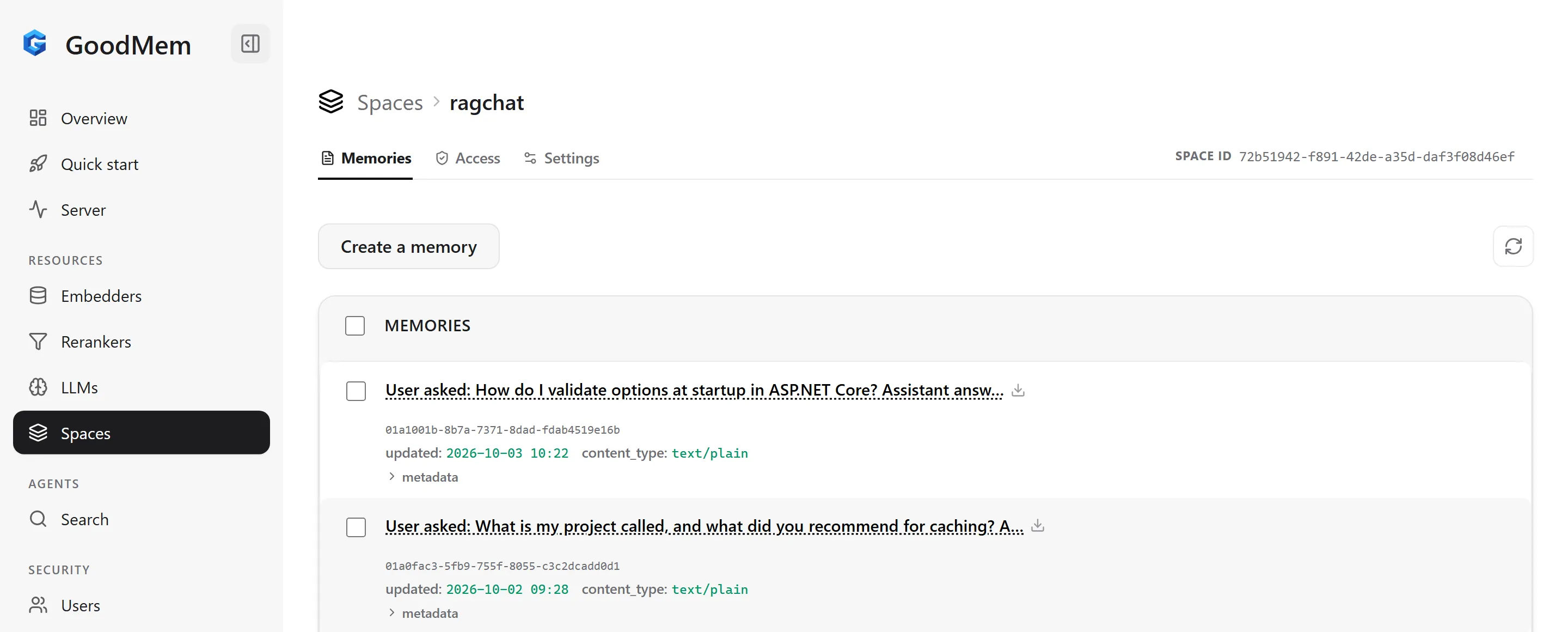
private Task RememberTurnAsync(string userId, string question, string answer, CancellationToken cancellationToken) => client.Memories.CreateAsync(new JsonMemoryCreationRequest { SpaceId = GoodMemIds.Space, OriginalContent = $"User asked: {question}\nAssistant answered: {answer}", Metadata = new Dictionary<string, object> { ["kind"] = "conversation", ["user_id"] = userId, ["title"] = "Earlier conversation" } }, cancellationToken);Each turn goes into the same space as the documents, with kind set to conversation and the owner in user_id. GoodMem chunks and embeds it like any other memory, so an earlier conversation can be found by meaning, the same way a document is found.
Here is how the stored turns look in the console.
A semantic search alone will not cover every follow-up question in a chat, though. A follow-up like “and how do I do that in Docker?” is not similar in meaning to the previous turn, so a search would not return it.
For this reason, I also load the last six turns, which is the RecentTurns constant, in the order they happened and send them in the Context property of the request.
private async Task<List<string>> GetRecentTurnsAsync(string userId, CancellationToken cancellationToken){    var turns = new List<string>();    var options = new MemoriesListOptions    {        Filter = OwnHistory(userId),        SortBy = "created_at",        SortOrder = SortOrder.Descending,        MaxResults = RecentTurns,        IncludeContent = true    };
    await foreach (var memory in client.Memories.ListAsync(GoodMemIds.Space, options, cancellationToken))    {        if (memory.OriginalContent is { Length: > 0 } content)        {            turns.Add(Encoding.UTF8.GetString(content));        }
        if (turns.Count == RecentTurns)        {            break;        }    }
    turns.Reverse(); // oldest first, the way a conversation reads    return turns;}
With these two methods in place, here is the AskAsync method that the endpoint calls. It loads the recent turns, builds the retrieve request that I showed earlier, reads the answer from the stream, and stores the new turn before it returns. This is also where ElapsedMs gets its value, which is why ReadAnswerAsync passes a 0 for it.
The first three lines are the deadline that I mentioned in the configuration section. They link a new token to the caller’s token and cancel it after the configured timeout, so the two minutes now cover loading the history, reading the whole streamed answer and storing the turn, and a caller that disconnects still cancels the work. The options here is an IOptions<GoodMemOptions> that the class gets through its constructor.
public async Task<ChatAnswer> AskAsync(string userId, string question, bool useReranker, CancellationToken cancellationToken){    // HttpClient.Timeout stops waiting once the response headers arrive, and the answer is streamed    // after them. This deadline covers the whole operation and still honours the caller's token.    using var deadline = CancellationTokenSource.CreateLinkedTokenSource(cancellationToken);    deadline.CancelAfter(options.Value.Timeout);    cancellationToken = deadline.Token;
    var stopwatch = Stopwatch.StartNew();    var recentTurns = await GetRecentTurnsAsync(userId, cancellationToken);    logger.LogDebug("Loaded {Count} recent turns for {UserId}", recentTurns.Count, userId);
    var request = BuildRequest(userId, question, recentTurns, useReranker);    var answer = await ReadAnswerAsync(client.Memories.RetrieveRawAsync(request, cancellationToken), useReranker);
    await RememberTurnAsync(userId, question, answer.Answer, cancellationToken);    return answer with { ElapsedMs = stopwatch.ElapsedMilliseconds };}
I repeated the two-second test with this deadline in place, and all three requests were cancelled at about two seconds. The cancellation surfaces as a TaskCanceledException, which the exception handler of the sample turns into a 500, so in a real application you would map it to a clearer response.
In my tests, the default prompts made the model ignore the conversation
This is the part that took me the longest to figure out, so let me explain what happened.
My first version of BuildRequest did not set the sys_prompt and prompt keys, so GoodMem used its default prompts. With that version, I asked two questions and then asked what my first question was. The API answered that the retrieved data did not contain a record of my earlier questions, even though the logs showed that the earlier turns were loaded and sent in Context.
To find out where they were getting lost, I sent a request directly to the REST API with a fact that existed only in the context, and the model again answered that the retrieved data did not contain it.
The default prompt template does include the context, under a “Previous conversation context” heading, so the turns do reach the model. In my tests with gpt-5-mini, the model ignored them because of GoodMem’s default system prompt.
That prompt tells the model to stick strictly to what is in the memory data, and to state that the available data does not address the query when the retrieved data has nothing relevant.
So the model sees the conversation, but it treats the conversation as something that it is not allowed to use. The chat post-processor reference lists the default prompts in full.
The fix is to supply your own prompts through the sys_prompt and prompt keys.
private const string SystemPrompt = """    You answer questions for a .NET developer using two sources: the previous conversation with this user and the retrieved content.    - The retrieved content has two kinds of entries: technical articles, and older conversation records of this same user. A conversation record has lines that start with "User asked:" and "Assistant answered:".    - For anything the user said or asked earlier, use the previous conversation and the "User asked:" lines of the older conversation records. For anything you answered earlier, use the "Assistant answered:" lines.    - Never present an example from an article as something the user said. If nothing the user said answers a question about them, say that you have no record of it.    - Use the articles for technical facts, and keep specific details, numbers and code exact.    - If neither source answers the question, say that you don't know.    - Keep the answer short and direct.    """;
private const string UserPrompt = """    {% if context|length > 0 -%}    Previous conversation, oldest first:    {%- for contextItem in context %}    {{ contextItem.text }}    {%- endfor %}
    {% endif -%}    Question: "{{ userQuery }}"
    Retrieved content:    {{ dataSection }}    """;
The user prompt is a Pebble template, which is the template language GoodMem uses. userQuery is the question, dataSection is the formatted list of retrieved chunks, and context is the list of conversation turns. I read contextItem.text in the loop because the default template prints the whole item, and that renders as text: "..." with escaped line breaks.
The third rule in the system prompt is there because of another thing I ran into. When a user with no history asked “What kind of API did I say I am building?”, the model found an article that mentions a product catalog API and answered as if the user had said it. No data from another user was involved, but the answer was still wrong.
My first fix was a rule that said the retrieved documents are articles and never things the user said. That rule was not accurate, because the search also returns the older conversation turns of the user, and the GoodMem team pointed this out when they reviewed the draft of this article. In their test, a fact that was no longer among the recent turns was found by the search, and the model still answered that it had no record of it.
So I ran the same kind of test on my setup. I told the API a project name and a deployment codename, asked seven unrelated questions so that the first turn was no longer among the last six, and then asked for both.
With the old rule, gpt-5-mini still gave both back in all six of my runs, three with the reranker and three without, so I could not reproduce the failure, and the GoodMem team had also told me that it depends on the model. What I did see was the first problem coming back. With the reranker on, a second user with no history was told that their project is called BookStoreAspire, which is an example from my Aspire article, in all three runs.
The first two rules of the prompt above now describe what the search really returns, and the third one keeps the article examples away from the user. With this prompt, the first user got both facts back in all six runs, and the second user was told in all six that there is no record.
The restart test
Now let’s check that the memory survives a restart. The first request tells the API something about the caller.
curl -X POST http://localhost:5162/api/chat \ -H "X-Api-Key: alice-demo-key" \ -H "Content-Type: application/json" \ -d '{ "question": "My project is called Zephyr Orders, a multi-instance order API. Should I use HybridCache or IMemoryCache?" }'The answer recommended HybridCache, because a multi-instance API needs a shared cache, and it cited my HybridCache and in-memory caching articles.
Next, I stopped the API and restarted both GoodMem containers, the database included.
docker restart goodmem-ragchat-db goodmem-ragchat-servercurl http://localhost:8080/readyzAfter that, I started the API again and asked a question that can only be answered from the earlier conversation.
curl -X POST http://localhost:5162/api/chat \ -H "X-Api-Key: alice-demo-key" \ -H "Content-Type: application/json" \ -d '{ "question": "What is my project called, and what did you recommend for caching?" }'Here is the response, with the answer and the citations shortened.
{ "answer": "Your project is called \"Zephyr Orders.\" I recommended using HybridCache ...", "reranked": false, "citations": [ { "title": "Earlier conversation", "url": null, "excerpt": "..." }, { "title": "HybridCache in ASP.NET Core .NET 10 - Complete Guide", "url": "https://codewithmukesh.com/blog/hybridcache-in-aspnet-core/", "excerpt": "..." }, { "title": "In-Memory Caching in ASP.NET Core .NET 10 - Complete Guide", "url": "https://codewithmukesh.com/blog/in-memory-caching-in-aspnet-core/", "excerpt": "..." } ]}The API remembered both the project name and its own recommendation, even though the API process had been stopped and both GoodMem containers had been restarted in between. The “Earlier conversation” entry in the citations is the stored turn coming back through the search.
This works because the API itself does not hold any state. Everything lives in PostgreSQL behind GoodMem, and the API only needs the four fixed IDs to find it again.
How do you keep one user’s memory away from another’s?
A chat API that stores conversations has to make sure that one user can never read another user’s history. I have seen samples that take a sessionId in the request body and use it to load the conversation, which means that anyone who can guess or copy another session ID can read that conversation.
In this API, the identity comes from authentication, so I added a small API key handler in Auth/ApiKeyAuthenticationHandler.cs with two demo users, and the user ID is read from the authenticated principal.
private static string UserId(ClaimsPrincipal user) => user.FindFirstValue(ClaimTypes.NameIdentifier)!;The handler in the sample is deliberately small, since its only job is to give the demo two users. In a real application, you would use what you already have, like API key authentication with hashed keys or JWT authentication. Either way, the user ID is taken from the token or the key and is never accepted as input.
That user ID then goes into a metadata filter on every search.
// Filters are plain strings with no parameter binding, so escape anything you put in them.private static string Quote(string value) => $"'{value.Replace("'", "''")}'";
private static string OwnHistory(string userId) =>    $"CAST(val('$.kind') AS TEXT) = 'conversation' AND CAST(val('$.user_id') AS TEXT) = {Quote(userId)}";
private static string DocumentsAndOwnHistory(string userId) =>    $"CAST(val('$.kind') AS TEXT) = 'document' OR ({OwnHistory(userId)})";
With this filter in place, a search returns the shared documents plus the conversation turns owned by the caller, and nothing else.
GoodMem filters are written as strings, a bit like a SQL WHERE clause over the metadata, and there is no way to pass parameters separately. This means that you are responsible for escaping any value that goes into the filter, and the Quote method does that by doubling single quotes. In this API the value comes from authentication, but I would still escape it every time.
To test it, I asked for the project name as a second user.
curl -X POST http://localhost:5162/api/chat \ -H "X-Api-Key: bob-demo-key" \ -H "Content-Type: application/json" \ -d '{ "question": "What is my project called?" }'Bob was told that the API has no record of his project name, and there was no “Earlier conversation” entry in his citations, while Alice got “Zephyr Orders” when she asked for it.
Deleting a user’s memory
Users should also be able to remove what they have said. GoodMem supports a batch delete with a filter, so the method behind the endpoint is short.
public async Task<long> ForgetAsync(string userId, CancellationToken cancellationToken){    var result = await client.Memories.BatchDeleteAsync(new BatchMemoryDeletionRequest    {        Requests =        [            new BatchDeleteMemorySelectorRequest            {                FilterSelector = new FilteredDeleteMemorySelectorRequest                {                    SpaceId = GoodMemIds.Space,                    Filter = OwnHistory(userId)                }            }        ]    }, cancellationToken);
    return result.TotalDeleted ?? 0;}
It uses the same OwnHistory filter as the search, so it deletes the caller’s conversation turns and leaves the documents alone. You can call it like this, and it returns the number of deleted memories.
curl -X DELETE http://localhost:5162/api/memory -H "X-Api-Key: alice-demo-key"Does a reranker improve the results?
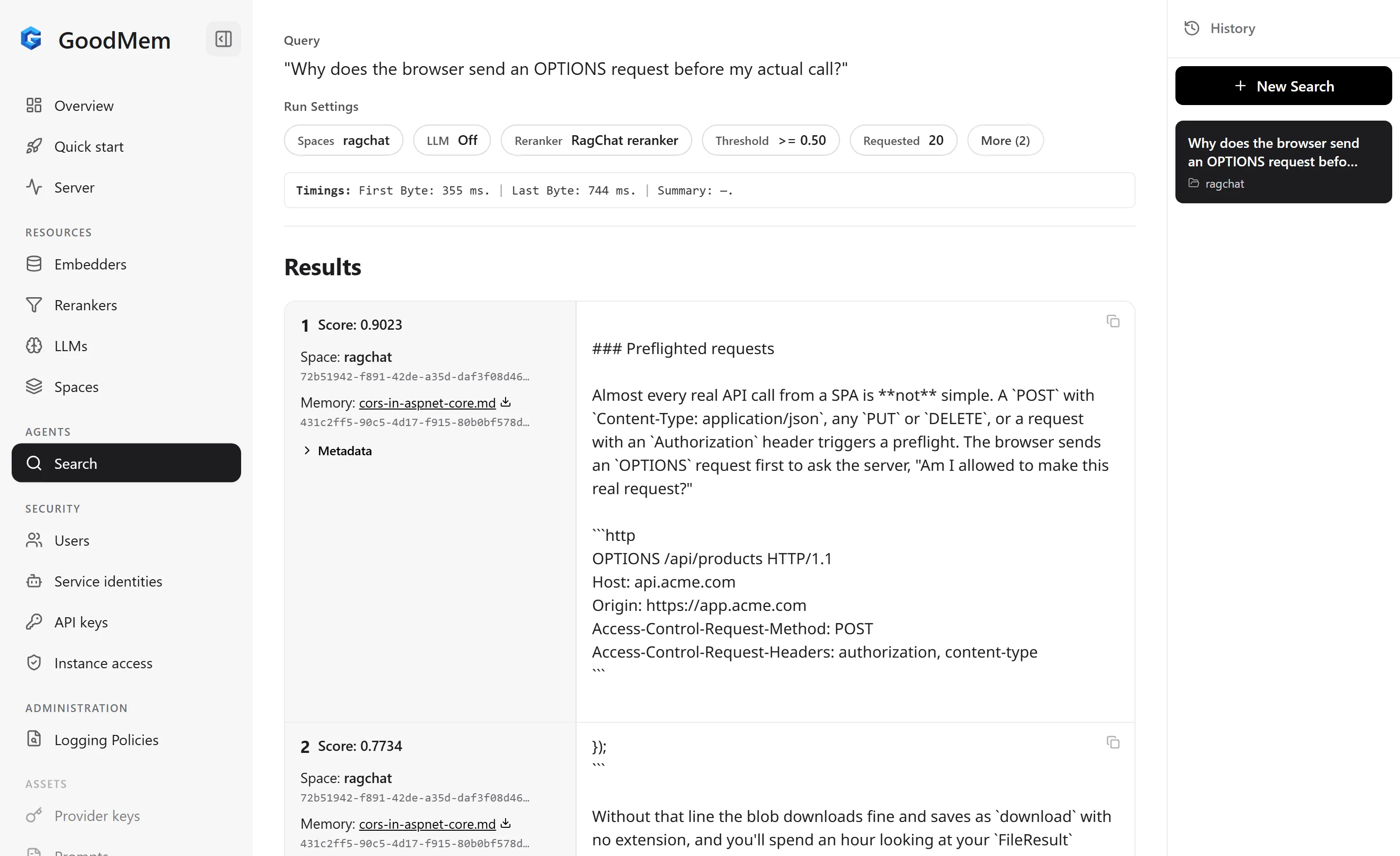
I wanted to see what a reranker changes on real questions, so I wrote 28 questions about the 19 articles. Each question is tied to the one article that should answer it, and I wrote them the way a developer would ask, without copying the headings. For example, “Why does the browser send an OPTIONS request before my actual call?” should find the CORS article.
You can try a single question like this from the Search page of the console as well. Here is that question with the reranker selected, and both of the top results come from the CORS article.
The eval endpoint runs every question in two modes, once with a plain search and once with the reranker, fetching 20 chunks each time. For each run, it finds the position of the expected article among the distinct articles returned. The response has a summary for each mode and the two ranks of every question, and the full code is in EvalService.cs in the repository.
curl -X POST "http://localhost:5162/api/eval?runs=3&withAnswer=true"I report three numbers for the ranking. hit@1 is how often the expected article came first, hit@3 is how often it was in the top three, and MRR, the mean reciprocal rank, is the average of one divided by the position, so 1.0 would mean the expected article was always first.
Here are the results from my machine, with GoodMem running locally in Docker, text-embedding-3-small as the embedder, rerank-2.5 as the reranker, and gpt-5-mini as the LLM. I repeated both modes three times for every question, which gives 84 timed requests for each of the first two rows, and the ranking is taken from the last of the three runs.
The API and GoodMem ran on the same machine, and OpenAI and Voyage were called over the internet from India. Every retrieve also includes a call to OpenAI to embed the question, so the 306 ms in the first row is more than the vector search alone.
The third row is 28 requests with GoodMem’s default prompts and all 20 chunks passed to the LLM, so it is there for the timing only, and it is a heavier request than the one the chat endpoint sends.
| Mode | hit@1 | hit@3 | MRR | p50 latency | p95 latency |
|---|---|---|---|---|---|
| Vector search only | 25 of 28 (89.3%) | 28 of 28 | 0.946 | 306 ms | 368 ms |
| Vector search + reranker | 27 of 28 (96.4%) | 28 of 28 | 0.982 | 658 ms | 737 ms |
| Vector search + reranker + LLM answer | same ranking | - | - | 7,965 ms | 10,284 ms |
The plain vector search was already right for 25 of the 28 questions, and the expected article was always in the top three.
The reranker moved two questions from second place to first, which were “Where should I keep a database password on my own machine so it never gets committed?” and “How do I stop new requests reaching a pod that is about to shut down?”. A third question, about putting a user’s roles into the access token, stayed in second place both times, behind the Refresh Tokens article.
With the reranker on, retrieval took about 352 ms longer at the median, which roughly doubles it. The third row puts that number in context, because writing the answer with the LLM took about 8 seconds, so the retrieval and the reranking together are less than a tenth of the total time of that request.
My reading of this is that on a small set of documents like mine, where most of the articles are about different topics, the reranker gives a small improvement, and you would be fine without it.
I would expect it to matter more as the knowledge base grows and more documents overlap in topic, because that is where the order of the candidates starts to decide the answer. I would measure it on your own content the same way before paying for it.
If you run this eval yourself, add a payment method at Voyage first. My account started without one and was limited to about three requests a minute, so my first eval run failed after a few questions with “Reranking request failed with status 429”, while single chat requests had worked fine.
Running the same API against GoodMem Cloud
Everything so far ran against GoodMem in Docker on my machine. GoodMem also has a hosted version, GoodMem Cloud , so I pointed the same API at a trial instance to see whether anything in the code has to change.
After you sign up, you get a dedicated instance, and its page in the dashboard gives you the REST base URL, the web console URL and an API key. The base URL and the key are the only two things that I had to change, and both of them are configuration.
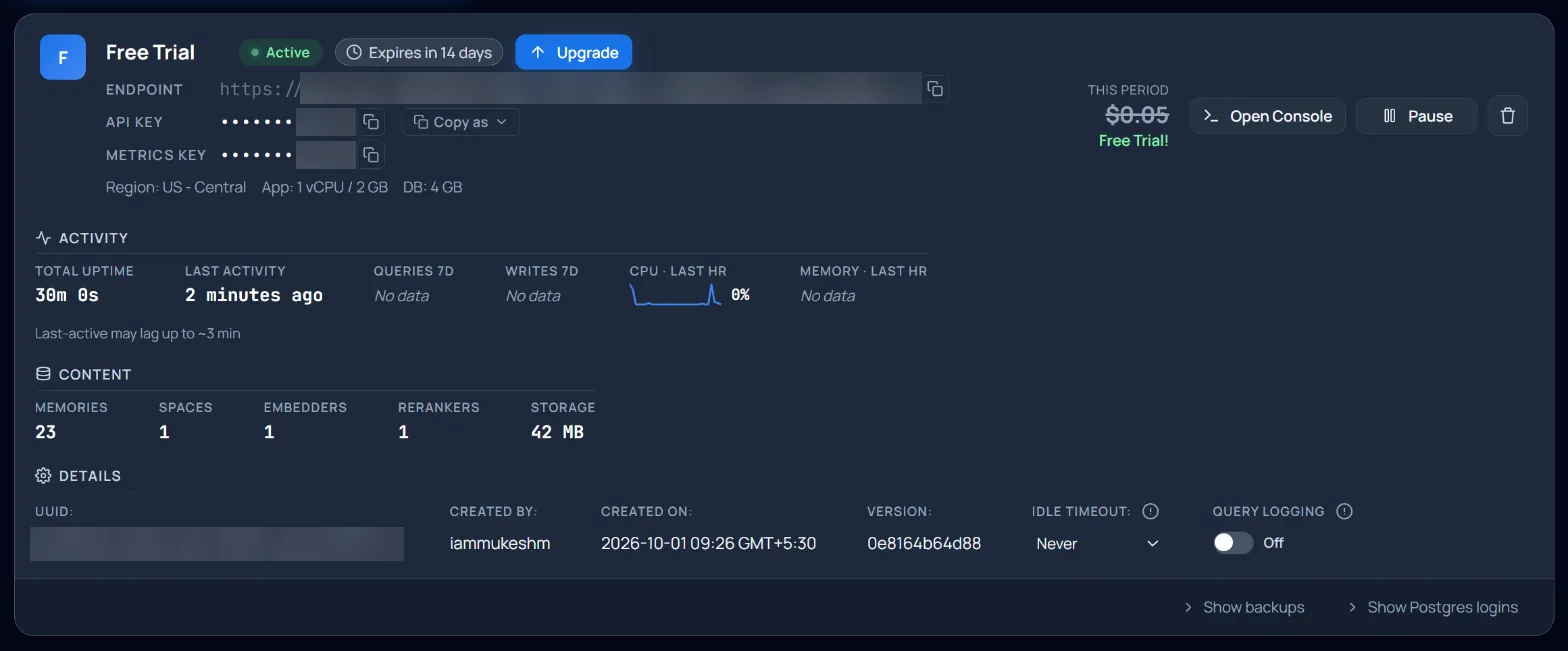
dotnet user-secrets set "GoodMem:BaseUrl" "https://<your-instance>.app.goodmem.ai" --project RagChat.Apidotnet user-secrets set "GoodMem:ApiKey" "<your Cloud API key>" --project RagChat.ApiWith these two values set, I did not have to change any C# code. The setup endpoint registered the three models, created the space and ingested the 19 articles, and a second call skipped all 19 of them, so the fixed IDs behave the same way on Cloud.
The instance has the same web console as the local install, and after the setup it shows the same three models.
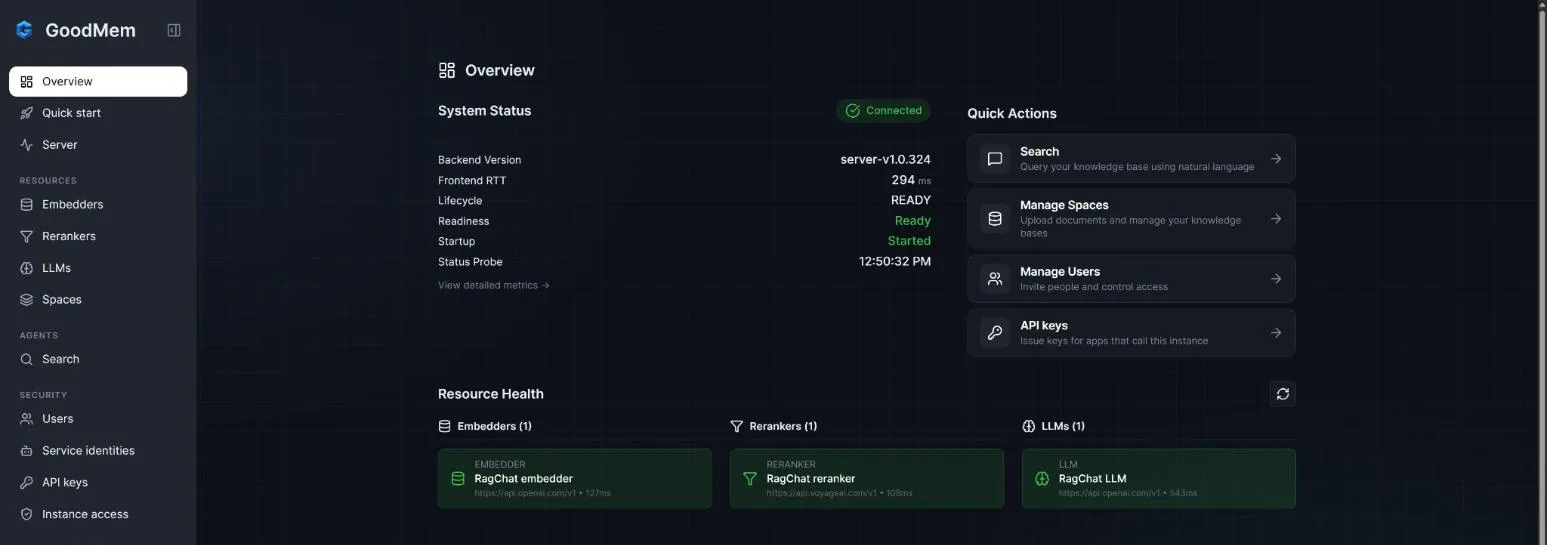
After that, I repeated the chat and memory tests. A chat request with the reranker on came back with the Options Pattern article as its citation. The API also remembered my project name and its caching recommendation after I stopped and started it, and the second user was again told that there is no record of a project. On Cloud, the GoodMem server is managed for you, so the API is the only part that I could restart.
I did not repeat the 28 questions on Cloud, so all the numbers in the previous section are from the local install.
Things to watch in production
The sample is a demo, and there are a few things I would take care of before putting something like this in front of real users.
- Protect the setup and eval endpoints. They are open in the sample only because it runs locally.
- Limit requests per user. Every chat request costs money at the LLM provider, so add the built-in rate limiting middleware.
- Treat stored content as untrusted input. Documents and conversation turns end up in the prompt, so be careful about who can add content, and decide how long you keep turns that can contain personal data.
- Lower
RequestedSizewhen you are not reranking. Themax_resultssetting only applies after a successful rerank, so without the reranker all 20 chunks go to the model, and one answer cited nine articles in my tests. The sample uses 20 in both modes, so change it before you run this without a reranker.
My take on GoodMem for .NET developers
I agreed with the GoodMem team before writing this that I would give my honest opinion in this section.
What I liked the most is how little code the application ended up with. The whole API is about 700 lines of C#, and it does not contain a vector database client, any chunking code, embedding calls, or a reranker client. The conversation also survives a restart, because the state is in PostgreSQL and the API only holds four IDs.
The SDK is also well made at the low level, since it is async everywhere, streams with IAsyncEnumerable, takes a CancellationToken on every call, has typed exceptions, and has no dependencies.
There are several rough edges for a .NET developer, and these are the main ones I ran into.
- The simple retrieve method has no filter and no context. A design like mine, with one shared space and a filter per user, has to use the raw request, with a Java class name and a dictionary of snake_case keys. A separate space per user would avoid the filter, but passing the recent turns still needs the raw request.
- Filters are plain strings with no parameters. This means that escaping the values is your job.
- In my tests with
gpt-5-mini, the default prompts made the model ignore the conversation context. The context is sent, but the default system prompt keeps the model on the retrieved data, which is a sensible default for plain RAG. This cost me the most time, and for a chat API I think the default should change. - A failed rerank does not fail the request. It falls back to the vector results and reports the failure as a status event in the stream, so you only notice it if your code reads those events.
- There is no .NET integration layer. There is no
AddGoodmemextension for dependency injection, no interfaces to mock in tests, and no integration withMicrosoft.Extensions.AIor the Agent Framework for .NET. - Some defaults and limits are worth knowing. The default timeout of the SDK is infinite, and on a streamed call the timeout that you set only covers the wait for the response headers. The answer falls back to a budget of 512 tokens,
max_resultsonly applies after a successful rerank, and the .NET SDK has no helper that waits for ingestion. - The docs named one stage differently from the server. The streaming reference called the retrieval stage
vector_search, while the server returnedretrievein my tests. I reported this to the GoodMem team, and they corrected the page before this article went live. - The native Windows install needs manual steps. The quick start points to WSL, which I did not test, and the native path needs two workarounds.
- The server is closed source and the ecosystem is small. The .NET package had about 3,200 downloads in total when I checked in early October 2026, so you will not find many answers outside the official docs.
If you are building an AI feature for many users and you want document retrieval, reranking and per-user memory without assembling them yourself, GoodMem gets you there quickly, and the self-hosted version costs nothing to try.
If you want everything inside the Microsoft abstractions, or your use case is a single user and a small set of documents, I would start with Microsoft.Extensions.AI and a vector store you already run.
If you want a fuller reference than my sample, the GoodMem team has published an official .NET RAG sample that covers more of the SDK.
Frequently asked questions
How do I implement RAG in ASP.NET Core?
Split your documents into chunks, create an embedding for each chunk, store them in a vector store, search them with the embedding of the user's question, and pass the best chunks to a language model that writes the answer. You can build this with Microsoft.Extensions.AI and a vector store, or use a server like GoodMem that does all of it behind one request. In this article the search, the reranking and the answer are a single call to RetrieveRawAsync from a .NET 10 Minimal API, and two more calls load and store the conversation.
How do I keep chat history for an AI chat app in .NET so it survives a restart?
Store every question and answer in a database instead of in memory, and load the recent turns before each new request. In this article each turn is stored as a GoodMem memory with the user's ID in its metadata, which GoodMem keeps in PostgreSQL. After stopping the API and restarting both GoodMem containers, the API still answered a question about the earlier conversation correctly.
What is the difference between RAG and long-term memory for AI agents?
RAG retrieves information from an external knowledge source such as your documents. Memory recalls selected knowledge from earlier interactions with a user. Conversation storage reloads the exact messages of a chat. A chat application usually needs all three.
Does reranking actually improve RAG results, and is it worth the latency?
In my test of 28 questions over 19 articles, the reranker raised hit@1 from 25 of 28 to 27 of 28 and the mean reciprocal rank from 0.946 to 0.982. It added about 352 ms at the median, taking retrieval from 306 ms to 658 ms, while the language model answer took about 8 seconds. On a small set of documents the gain is small, and I would expect it to grow with a larger and more overlapping knowledge base.
How do I stop one user's chat memory leaking into another user's session?
Take the user ID from the authenticated caller instead of the request body, and add it to a filter on every search and every list call. In this article each conversation turn is stored with a user_id in its metadata, and every retrieve request filters on documents plus the caller's own turns.
What chunk size should I use for RAG?
There is no single correct value. GoodMem defaults to recursive chunking with 512 characters per chunk and 64 characters of overlap, and I kept that default for the articles in this test. Treat it as a starting point and test other sizes against your own questions. In GoodMem the default chunking of a space cannot be changed later, but a single memory can be created with its own chunking configuration, and content that is already stored has to be ingested again to be chunked differently.
Do I need Microsoft Agent Framework or Semantic Kernel for RAG in .NET?
No. The API in this article uses neither and calls the GoodMem client directly from a Minimal API. The Agent Framework is useful when you want agents, tools and workflows, and it has its own context providers for memory and RAG. Microsoft has said that Semantic Kernel will keep getting critical bug and security fixes, while most new features are built for the Agent Framework.
Summary
In this article, I built a chat API in ASP.NET Core on .NET 10 that answers questions over a set of documents, returns its sources, and remembers each user’s conversation across restarts.
Along the way, I found that in my tests with gpt-5-mini the default prompts had to be replaced before the conversation context was used, that a failed rerank does not fail the request, and that a reranker gave a small improvement on my 28 questions for about 352 ms of extra time.
You can clone the repository, point it at your own Markdown files, write a few questions of your own, and run the same eval to see how it behaves on your content.
If you found this article helpful, do share it with your colleagues.
Happy Coding :)




What's your take?
Push back, share a war story, or ask the obvious question someone else is wondering. I read every comment.