


A front-end developer on the team pushes a new React build to https://app.acme.com. The login form fires a POST to https://api.acme.com/auth/login and the browser DevTools console lights up with the error every .NET developer has stared at: Access to fetch at 'https://api.acme.com/auth/login' from origin 'https://app.acme.com' has been blocked by CORS policy: No 'Access-Control-Allow-Origin' header is present on the requested resource. The endpoint works fine in Postman. The deployment is healthy. Nothing is wrong with the API code. The browser is doing exactly what it is supposed to do, and the fix is on the server.
CORS in ASP.NET Core .NET 10 is configured by registering policies with builder.Services.AddCors(...), attaching the middleware with app.UseCors("policy"), and either applying the policy globally or per-endpoint with RequireCors("policy") and [EnableCors("policy")]. CORS (Cross-Origin Resource Sharing) is a browser-enforced security mechanism that tells the browser which cross-origin requests are safe for the server to receive - it relaxes the Same-Origin Policy in a controlled way. It does not protect the API from non-browser clients like Postman, curl, or another server. That is an important distinction that drives every configuration decision in this article.
In this article I will walk through what CORS actually is and what it is not, how the preflight handshake works in practice, every way to register a policy in .NET 10 (default, named, endpoint-specific), the seven misconfigurations I see in production audits, the AllowAnyOrigin + AllowCredentials combination that the framework will refuse to run, how CORS interacts with cookies and JWT (JSON Web Tokens), and how it sits next to CSRF (Cross-Site Request Forgery) and the Same-Origin Policy. I’ll also cover the two failures that only show up once there’s infrastructure in front of your API - the Vary: Origin header that CDNs and output caching depend on, and the duplicate-header problem you get behind nginx or an ingress controller. Let’s get into it.
TL;DR. For ASP.NET Core .NET 10, register CORS with
builder.Services.AddCors(options => options.AddPolicy("Default", p => p.WithOrigins("https://app.acme.com").AllowAnyHeader().AllowAnyMethod())), then callapp.UseCors("Default")afterUseRoutingand beforeUseAuthorization. Never combineAllowAnyOrigin()withAllowCredentials()- the framework throwsInvalidOperationExceptionwhile the app starts, so the app never boots, and the Fetch standard forbids it outright. For authenticated SPAs, pin specific origins withWithOrigins(...)and callAllowCredentials(). Use named policies; the default-policy slot is fine for single-frontend apps but limiting once you have an admin app, a marketing site, and a mobile-web wrapper hitting the same API. CORS is not authentication, not rate limiting, and not a firewall. It is a browser contract that protects users from cross-origin script abuse - the API still needs its own auth, validation, and rate limiting.
Middlewares in ASP.NET Core
CORS is middleware. The order it sits in your pipeline relative to UseAuthentication, UseRouting, and UseRateLimiter changes its behavior. This article covers the full middleware pipeline model.
Pick your level. This is a long article. You don’t have to read it top to bottom:
- Seeing your first CORS error? Start with The Same-Origin Policy and Setup.
- Already have CORS wired up? Jump to Common Misconfigurations and the Best Practices checklist.
- Building an authenticated SPA? Go straight to CORS with Credentials and the CORS vs CSRF section.
- Works locally, breaks in production? You want the
Vary: Origintrap and CORS behind a reverse proxy. That’s where CDNs, output caching, and nginx break policies that pass every test.- Multi-tenant with per-customer subdomains? Start at Wildcard Subdomains and Dynamic Origins.
What Is CORS in ASP.NET Core?
CORS (Cross-Origin Resource Sharing) is a browser security mechanism that lets a server tell the browser, “Yes, it is safe for a page from this other origin to read my response.” It’s defined by the WHATWG Fetch Living Standard (it used to live in a separate W3C draft, but the canonical home is now Fetch) and implemented by every major browser. In ASP.NET Core, support lives in Microsoft.AspNetCore.Cors and is built into the shared framework - no extra NuGet package required.
An origin is the triplet scheme + host + port. https://app.acme.com, https://app.acme.com:8443, and http://app.acme.com are three different origins. A cross-origin request is any request a browser makes from one origin to another - and by default, the browser blocks the JavaScript on the calling page from reading the response unless the server explicitly opts in with the right response headers.
The .NET 10 implementation ships with the [EnableCors] and [DisableCors] attributes, a fluent CorsPolicyBuilder for policy definition, the UseCors middleware, and endpoint metadata via RequireCors(...). The reference docs are at learn.microsoft.com/en-us/aspnet/core/security/cors.
What Is the Same-Origin Policy and Why Does CORS Exist?
CORS only makes sense if you understand the rule it relaxes. The Same-Origin Policy (SOP) is a browser security model that has been in place since Netscape 2 in 1995. It says: JavaScript running on a page from origin A cannot read responses from origin B. Without it, a malicious page at evil.com could fetch('https://bank.com/account') while you are logged in, read your account balance, and exfiltrate it. The browser stops this from happening - the request might go out, but the JavaScript cannot see the response.
That sounds great until you build a real application. A modern SPA at https://app.acme.com calling an API at https://api.acme.com is, by SOP definition, a cross-origin request. So is a Blazor WebAssembly app calling its own backend on a different port. SOP would block every legitimate front-end the team writes.
CORS is the controlled relaxation of SOP. The server tells the browser - via response headers - which origins are allowed to read responses, which methods are allowed, and which headers can be sent. The browser still enforces the policy; the server just provides the permission slip.
This is the single most important mental model for CORS:
- SOP is the default. CORS opens specific holes in it.
- The browser enforces both. The server only declares intent.
- Non-browser clients (Postman, curl, server-to-server) ignore both. That’s why your API works in Postman and fails in the browser.
Does CORS Actually Secure My API?
This is where most developers get it wrong, and it drives the rest of the article. CORS does not secure your API. It’s a browser-side mechanism that protects your users, not your server. Here is what that means in practice:
- A browser at
https://evil.comcalling your API athttps://api.acme.comgets blocked from reading the response - that’s CORS doing its job on behalf of the user. - A Node.js script, a Python
requestscall, a curl command, or another server hittinghttps://api.acme.combypasses CORS entirely. There’s no browser in the chain, so there’s no enforcement. - A simple cross-origin request (a
GETor aPOSTwith a safelistedContent-Type) still reaches your endpoint and may execute. The browser blocks the response, not the request, so JavaScript on the calling page can’t read what came back - but side effects like database writes can already have happened. For preflighted requests (JSON body,PUT,DELETE, custom headers), the browser sends anOPTIONSfirst and never sends the real request if the preflight fails. That’s genuine protection at the request layer, but it is browser-enforced, not API-enforced.
The takeaway: CORS is part of your security posture, not the whole of it. The API still needs authentication (JWT bearer tokens or API keys), rate limiting, input validation, and proper authorization on every endpoint. Treating CORS as a firewall is the misconfiguration that turns into a “well-intentioned but useless” line of defense in production.
How CORS Works: Simple Requests and Preflight
CORS splits cross-origin requests into two categories, and the difference matters because it changes the number of network round-trips.
Simple requests
A request is “simple” - and skips preflight - only if it meets all of these conditions:
- Method is one of
GET,HEAD, orPOST. - The only request headers set by the script are CORS-safelisted ones:
Accept,Accept-Language,Content-Language,Range(single-range value only), andContent-Type(with a safelisted value). Content-Type, if present, is one ofapplication/x-www-form-urlencoded,multipart/form-data, ortext/plain.- No
ReadableStreambody, no event listeners onXMLHttpRequestUpload.
For a simple request, the browser just sends the request with an Origin: https://app.acme.com header. The server replies with Access-Control-Allow-Origin: https://app.acme.com (or *) and the browser decides whether to expose the response to the calling script.
Preflighted requests
Almost every real API call from a SPA is not simple. A POST with Content-Type: application/json, any PUT or DELETE, or a request with an Authorization header triggers a preflight. The browser sends an OPTIONS request first to ask the server, “Am I allowed to make this real request?”
OPTIONS /api/products HTTP/1.1Host: api.acme.comOrigin: https://app.acme.comAccess-Control-Request-Method: POSTAccess-Control-Request-Headers: authorization, content-typeThe server replies with the CORS headers describing what is permitted:
HTTP/1.1 204 No ContentAccess-Control-Allow-Origin: https://app.acme.comAccess-Control-Allow-Methods: GET, POST, PUT, DELETEAccess-Control-Allow-Headers: authorization, content-typeAccess-Control-Max-Age: 600Access-Control-Allow-Credentials: true 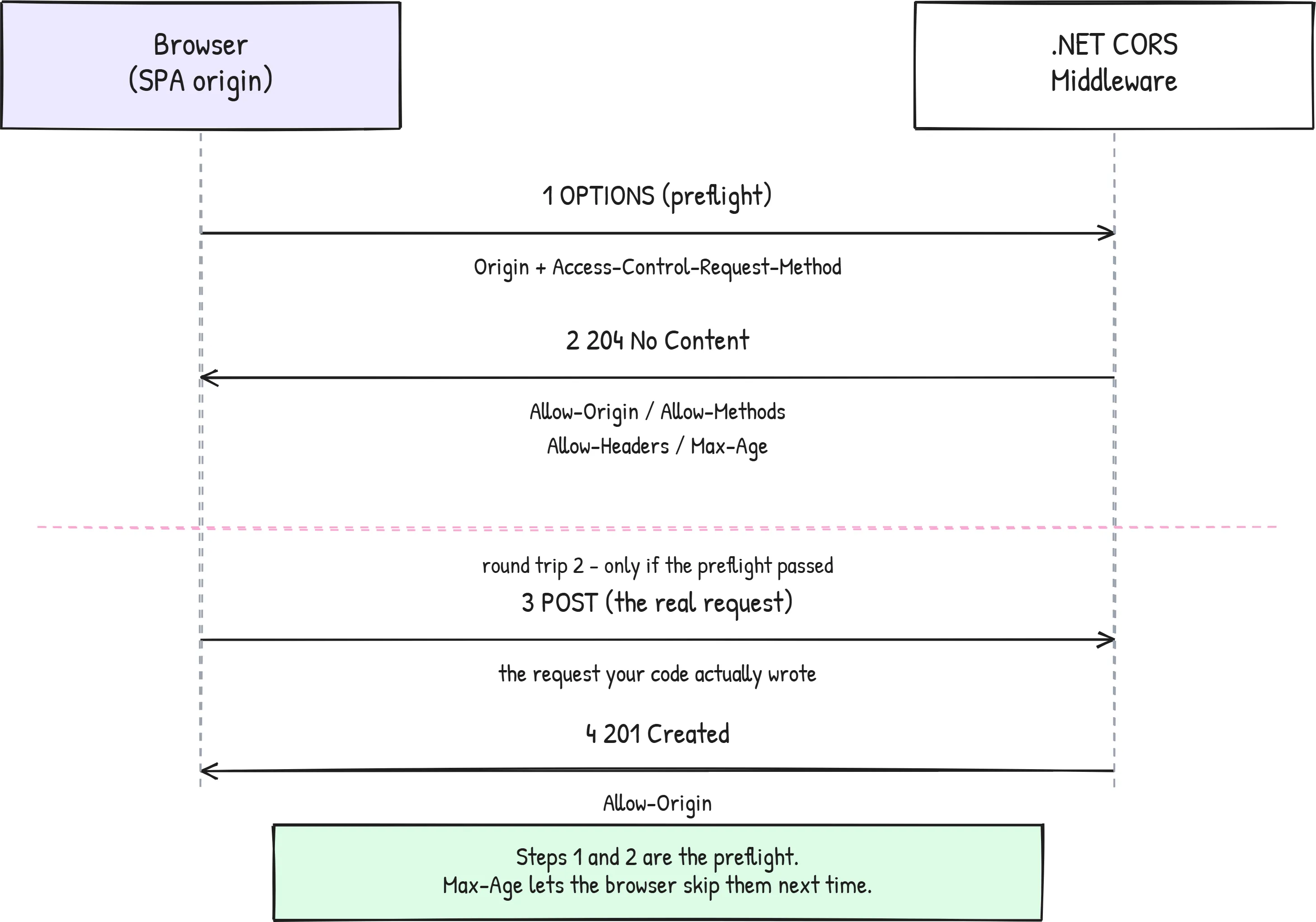
That picture is the whole model. Two round trips, not one, and the second one never happens if the first is rejected. Only after the browser sees a successful preflight response does it send the real POST. The Access-Control-Max-Age header tells the browser how long it can cache the preflight result; setting this prevents an OPTIONS round-trip before every single API call. The Fetch spec leaves the cap to each user agent - Chromium-based browsers (Chrome, Edge) clamp around 2 hours, Firefox around 24 hours, and Safari/WebKit historically much lower (around 10 minutes). Set the value you want and the browser will silently clamp.
This is also why CORS errors only show up at runtime in the browser. The preflight OPTIONS is invisible in most server logs unless explicitly captured.
Setup: AddCors and UseCors
Every CORS-aware ASP.NET Core app follows the same three-step setup. I’ll use this pattern in every example below.
1. Register a policy
var builder = WebApplication.CreateBuilder(args);
builder.Services.AddCors(options =>{    options.AddPolicy("AcmeFrontend", policy =>    {        policy.WithOrigins("https://app.acme.com")              .WithMethods("GET", "POST", "PUT", "DELETE")              .WithHeaders("Authorization", "Content-Type")              .SetPreflightMaxAge(TimeSpan.FromMinutes(10));    });});
I prefer explicit WithMethods and WithHeaders over AllowAnyMethod/AllowAnyHeader in production. The configuration documents intent: “this front-end uses these methods and these headers.” When a new method shows up that nobody added, that’s a signal worth investigating.
2. Add the middleware
var app = builder.Build();
app.UseRouting();app.UseCors("AcmeFrontend");app.UseAuthentication();app.UseAuthorization();
app.MapControllers();app.Run();
The order matters. UseCors must be called after UseRouting (if you use endpoint-specific policies) and before UseAuthentication and UseAuthorization. Otherwise, whenever authorization applies to the preflight, the OPTIONS request gets caught by auth middleware first - and a preflight never carries credentials - so it returns a 401 without CORS headers, and the browser surfaces it as a CORS failure. That happens when you require a logged-in user by default (a FallbackPolicy) or use endpoint-level RequireCors. I tested both on .NET 10: the preflight got a 401, and Chrome’s console error said Response to preflight request doesn't pass access control check: No 'Access-Control-Allow-Origin' header is present on the requested resource. - it never mentions the 401. With a global UseCors("AcmeFrontend") and RequireAuthorization() only on the endpoint, the same wrong order still returned 204, which is why this bug hides until someone adds a fallback policy. Put UseCors before auth and you never have to think about it. This is the second most common production CORS bug, right behind the AllowCredentials trap.
3. Apply the policy
Three options here. Pick one consistently:
// Option A: globally, via UseCorsapp.UseCors("AcmeFrontend");
// Option B: per endpoint with Minimal APIsapp.MapGet("/api/products", (IProductService products, CancellationToken ct)        => products.GetAllAsync(ct))   .RequireCors("AcmeFrontend");
// Option C: per controller with the attribute[EnableCors("AcmeFrontend")]public class ProductsController : ControllerBase { }
Default Policy vs Named Policies vs Endpoint-Specific
CORS in ASP.NET Core supports three policy scopes. Picking the wrong one costs you flexibility you’ll need later.
| Scope | When to use | Trap |
|---|---|---|
Default policy (AddDefaultPolicy) | Single SPA in front of a single API. Internal admin tools with one front-end. | You only get one. The second front-end has nowhere to plug in. |
Named policy (AddPolicy("Name", ...)) | Public + admin + mobile-web hitting the same API. Recommended default. | None - it’s the right pattern for almost every real app. |
Endpoint-specific (RequireCors, [EnableCors]) | One endpoint needs different origins (e.g., a public webhook receiver). | Easy to forget on a new endpoint - test the OPTIONS preflight explicitly. |
My take: start with one named policy per logical client. AcmeFrontend, AcmeAdmin, AcmePublic. Wire them up globally where it makes sense and override per-endpoint only when you have a real reason. Avoid the default-policy slot - it looks tidy for one client and becomes a refactor when you grow.
Configuring CORS from appsettings.json
Hard-coding origins in Program.cs works for a demo. In production I read them from configuration so the same binary runs in dev, staging, and prod without recompiling. Pair this with the Options pattern and you get validation for free.
appsettings.Production.json:
{ "Cors": { "AcmeFrontend": { "Origins": [ "https://app.acme.com", "https://admin.acme.com" ], "AllowCredentials": true, "PreflightMaxAgeSeconds": 600 } }}Program.cs:
var corsSection = builder.Configuration.GetSection("Cors:AcmeFrontend");var origins = corsSection.GetSection("Origins").Get<string[]>() ?? [];var allowCredentials = corsSection.GetValue<bool>("AllowCredentials");var maxAge = corsSection.GetValue<int>("PreflightMaxAgeSeconds");
builder.Services.AddCors(options =>{    options.AddPolicy("AcmeFrontend", policy =>    {        policy.WithOrigins(origins)              .WithMethods("GET", "POST", "PUT", "DELETE", "PATCH")              .WithHeaders("Authorization", "Content-Type", "X-Correlation-Id")              .SetPreflightMaxAge(TimeSpan.FromSeconds(maxAge));
        if (allowCredentials)        {            policy.AllowCredentials();        }    });});
For local dev, appsettings.Development.json can list https://localhost:5173 (Vite) or https://localhost:4200 (Angular CLI). For staging and prod, list only the actual deployed origins. Do not ship * to production.
Environment-based Configuration in ASP.NET Core
The pattern above relies on environment-specific appsettings files. This article covers the full configuration model - appsettings.json, environment variables, and launch profiles - so you do not leak dev origins to production.
Wildcard Subdomains and Dynamic Origins
A hard-coded origin list breaks down the moment you go multi-tenant. If every customer gets https://acme.tenant.myapp.com, https://globex.tenant.myapp.com, and so on, you can’t enumerate them in appsettings.json. .NET 10 gives you two escape hatches, and they have very different risk profiles.
Wildcard subdomains. Put a * in the origin and opt in explicitly:
options.AddPolicy("TenantApps", policy =>{ policy.WithOrigins("https://*.myapp.com") .SetIsOriginAllowedToAllowWildcardSubdomains() .WithMethods("GET", "POST", "PUT", "DELETE") .WithHeaders("Authorization", "Content-Type");});The * has to actually be in the origin string - SetIsOriginAllowedToAllowWildcardSubdomains() on its own does nothing. Scheme and port still match exactly, so https://*.myapp.com won’t accept http://acme.myapp.com or https://acme.myapp.com:8443. Only the host label is wildcarded.
Worth saying plainly: this widens your trust boundary to every subdomain of that domain. If anyone can register a subdomain on myapp.com - a customer-controlled CNAME, an abandoned staging host, a marketing tool pointed at a vendor - they inherit your CORS grant. Subdomain takeover goes from an embarrassment to an API compromise. I’d only reach for this when subdomains are provisioned by your own deployment pipeline and nothing else.
Dynamic predicates. SetIsOriginAllowed takes a Func<string, bool> and hands you full control:
options.AddPolicy("TenantApps", policy =>{ policy.SetIsOriginAllowed(origin => Uri.TryCreate(origin, UriKind.Absolute, out var uri) && uri.Scheme == Uri.UriSchemeHttps && uri.Host.EndsWith(".myapp.com", StringComparison.OrdinalIgnoreCase)) .AllowAnyHeader() .AllowAnyMethod();});This is the sharpest tool in the CORS API and the easiest one to cut yourself on. Two rules I hold to:
- Parse the origin, never string-match it.
origin.Contains("myapp.com")happily acceptshttps://myapp.com.evil.com. Build aUriand checkHostandSchemeas separate values. - Never source the predicate from runtime data. Reading allowed origins from a database column that an admin screen can edit turns one compromised admin session into a permanent CORS bypass. Allowed origins are a deployment-time decision.
Both of these also change caching behavior, which is the next section - and the reason this pairs badly with a CDN if you’re not paying attention.
CORS, Caching, and the Vary: Origin Trap
This is the CORS bug that survives code review, passes every test, and then leaks across tenants in production. Almost nothing written about ASP.NET Core CORS covers it.
The setup: Access-Control-Allow-Origin is a response header whose value depends on the request’s Origin header. Any cache sitting between your API and the browser - output caching, response caching middleware, a CDN, a reverse proxy - stores responses keyed by URL. If it stores a response containing Access-Control-Allow-Origin: https://app.acme.com and then serves that same cached copy to a browser on https://admin.acme.com, the second origin gets a header that wasn’t meant for it. Depending on which way the mismatch falls, you either break a legitimate front-end or hand one tenant a response minted for another.
Vary: Origin is the fix. It tells caches to key the entry on the request’s Origin header, not just the URL. ASP.NET Core emits it for you, but not always - and the exception is the case people actually ship. From CorsService:
// when the policy allows any originresult.VaryByOrigin = policy.SupportsCredentials;
// when the policy lists specific originsresult.VaryByOrigin = policy.Origins.Count > 1 || !policy.IsDefaultIsOriginAllowed;
Read that second line carefully. A policy with exactly one origin and the default matching function sets VaryByOrigin to false, so no Vary: Origin header goes out. That’s correct in isolation - one allowed origin means the header can only ever have one value, so there’s nothing to vary on. It stops being correct the moment a second policy, a second origin, or an [EnableCors] attribute on one controller introduces a second possible value for the same URL. Now you have a cacheable response whose CORS header depends on the caller, and nothing telling the cache about it.
The three configurations that bite:
| Configuration | Vary: Origin emitted? | Risk |
|---|---|---|
| One origin, default matching | No | Safe alone. Breaks as soon as any other policy can serve the same route. |
| Two or more origins | Yes | Handled correctly by the framework. |
SetIsOriginAllowed / wildcard subdomains | Yes (IsDefaultIsOriginAllowed is false) | Handled, but the cache key now fans out per origin - watch your hit rate. |
AllowAnyOrigin() without credentials | No | Safe - the header is the constant *, so there’s nothing to vary on. |
AllowAnyOrigin() + credentials | n/a | Throws. See above. |
What I do about it:
- Put
UseCorsbeforeUseResponseCachingand beforeUseOutputCache. CORS has to write its headers before anything decides to store the response. Microsoft calls this out for response caching specifically, and the same logic applies to output caching and the rest of the .NET 10 caching stack. - Don’t cache credentialed responses at all. If
AllowCredentials()is on the policy, the response is user-specific. Mark itno-storeand stop thinking about it. - Check the header at the edge, not in the app. Curl your CDN twice with different
Originvalues and compare what comes back:
curl -sI https://api.acme.com/api/products -H "Origin: https://app.acme.com" | grep -i "access-control-allow-origin\|vary\|age\|cf-cache-status"curl -sI https://api.acme.com/api/products -H "Origin: https://admin.acme.com" | grep -i "access-control-allow-origin\|vary\|age\|cf-cache-status"If the second call returns the first origin, you’ve got a poisoned cache entry. A non-zero Age with a mismatched origin is the smoking gun.
CORS Behind a Reverse Proxy
The other deployment-shaped CORS bug: duplicate headers. Containerized APIs usually sit behind nginx, YARP, an ingress controller, or an API gateway, and every one of those can add CORS headers of its own. When the proxy adds Access-Control-Allow-Origin and ASP.NET Core adds it too, the browser sees the header twice and rejects the response outright:
The 'Access-Control-Allow-Origin' header contains multiple values'https://app.acme.com, https://app.acme.com', but only one is allowed.Note that the two values are often identical. Both layers are configured correctly and agree with each other, and the response still fails - which is why this one burns so much time. The rule is simple: exactly one layer owns CORS. Pick the application, delete the add_header directives from nginx, and keep the policy versioned with the code that depends on it. The only reason to do it at the proxy is if you’re fronting something that can’t do CORS itself.
Two related proxy issues worth knowing:
OPTIONSnever reaching the app. Some gateways answer or dropOPTIONSthemselves. If your preflight returns something the app would never send, curl the app directly on its container port and compare.- Scheme mismatch behind TLS termination. The proxy terminates HTTPS and forwards plain HTTP, so the app builds redirect URLs with the wrong scheme and origins stop matching. Wire up
UseForwardedHeaderswithForwardedHeaders.XForwardedProtobeforeUseCors.
Endpoint-Specific CORS for Public Webhooks
Most endpoints share a policy. Public webhooks are the exception. A Stripe webhook receiver, a GitHub webhook handler, or a public OAuth callback may need different (or no) CORS treatment from the rest of the API.
app.MapPost("/webhooks/stripe", async (    HttpRequest req,    IStripeHandler handler,    CancellationToken ct) =>{    return await handler.HandleAsync(req, ct);}).RequireCors(policy => policy.WithOrigins("https://stripe.com"));
app.MapPost("/api/orders", async ([FromBody] CreateOrder req) =>{    return Results.Created($"/api/orders/{Guid.NewGuid()}", req);}).RequireCors("AcmeFrontend");
RequireCors accepts either a policy name or an inline CorsPolicy configuration. The endpoint metadata wins over the global default - which is exactly what you want for surgical exceptions. To opt an endpoint out of CORS entirely (server-to-server only), apply [DisableCors] or do not call RequireCors and ensure no global UseCors policy applies.
CORS with Credentials: Cookies and JWT
This is where most CORS mistakes turn into real security bugs. “Credentials” in CORS means cookies, HTTP authentication headers, and TLS client certificates. The browser does not send these on cross-origin requests unless three things line up:
- The fetch call opts in:
fetch(url, { credentials: 'include' })oraxios.defaults.withCredentials = true. - The server returns
Access-Control-Allow-Credentials: true. - The server returns a specific origin in
Access-Control-Allow-Origin- never*.
In ASP.NET Core that translates to:
options.AddPolicy("AcmeAuthenticated", policy =>{ policy.WithOrigins("https://app.acme.com") .AllowAnyHeader() .AllowAnyMethod() .AllowCredentials();});If you try to combine AllowAnyOrigin() with AllowCredentials(), the framework throws System.InvalidOperationException: The CORS protocol does not allow specifying a wildcard (any) origin and credentials at the same time. Configure the CORS policy by listing individual origins if credentials needs to be supported. The throw happens inside CorsPolicyBuilder.Build(), which AddPolicy calls when the CORS options are built. With UseCors in the pipeline that happens while the app starts, so this is a startup failure: I ran it on .NET 10 and dotnet run crashed with an unhandled exception before the app ever listened for a request. This is the framework saving you from yourself - the Fetch standard forbids the combination, and even browsers that did not enforce it would let any site on the internet make authenticated requests to your API on the user’s behalf.
JWT in Authorization headers is still “credentials” in some setups
A JWT in Authorization: Bearer ... is not an HTTP credential by the strict CORS definition, but the fact that you are sending an Authorization header at all triggers a preflight and requires WithHeaders("Authorization") (or AllowAnyHeader). If your front-end stores the JWT in localStorage and attaches it explicitly, you don’t need AllowCredentials. If you store the JWT in an HttpOnly cookie, you do.
JWT Authentication in ASP.NET Core
Cookie-based JWT and header-based JWT have different CORS implications. This article covers the full bearer-token setup, including refresh tokens and the trade-offs between cookie and header transport.
7 Common CORS Misconfigurations I See in Production
This is the section worth bookmarking. Every CORS audit I run turns up some combination of these.
1. Wildcard origin in production. AllowAnyOrigin() works in dev and “fixes” the CORS error fastest, so it leaks into production. Any website can now use your authenticated user’s session (if cookies happen to align) or trigger side-effect endpoints from a phishing page. Pin specific origins.
2. AllowAnyOrigin + AllowCredentials. As discussed, the framework throws on this. But teams sometimes “fix” it by reflecting whatever Origin arrives - which is functionally the same thing. Never echo the request Origin header unconditionally back as Access-Control-Allow-Origin.
3. Origin reflection from a list without validation. Reading allowed origins from configuration is fine. Reading them from a database column that an admin user can edit is not - one compromised admin account turns into a CORS bypass. Treat the allowed-origins list as a deployment-time setting, not a runtime one.
4. Wrong middleware order. UseCors placed after the auth middleware means that, once authorization covers the preflight (a FallbackPolicy that requires a logged-in user, or endpoint-level RequireCors), the OPTIONS request (which carries no credentials) gets rejected with 401 before CORS headers are written. The browser then surfaces a confusing CORS error that never mentions the 401. Always: UseRouting → UseCors → UseAuthentication → UseAuthorization.
5. Forgetting to expose custom response headers. By default, browsers expose only a small safelist of response headers to JavaScript: Cache-Control, Content-Language, Content-Length, Content-Type, Expires, Last-Modified, and Pragma. Everything else is invisible to fetch. If you return X-Total-Count for pagination or X-Correlation-Id for tracing, you have to call WithExposedHeaders("X-Total-Count", "X-Correlation-Id") or the front-end won’t see them. The header is on the wire - open DevTools and it’s right there - but response.headers.get(...) returns null. That gap between what you can see and what your code can read is what makes this one so confusing to debug.
The case that catches almost everyone is file downloads. Content-Disposition isn’t safelisted, so a cross-origin download endpoint returns the filename and the browser hides it:
options.AddPolicy("AcmeFrontend", policy =>{ policy.WithOrigins("https://app.acme.com") .WithExposedHeaders("Content-Disposition", "X-Total-Count", "X-Correlation-Id");});Without that line the blob downloads fine and saves as download with no extension, and you’ll spend an hour looking at your FileResult before suspecting CORS.
6. No preflight cache. Forgetting SetPreflightMaxAge means every CORS-triggering API call sends an OPTIONS round-trip first. For a page that fires 30 calls, that is 30 wasted preflights. Set a sensible cache (10 minutes is a good default).
7. Trusting CORS as a security boundary. The framework lets the request through to the endpoint; only the response is blocked from the browser. A non-browser client still hits the route. If the endpoint is POST /api/orders with no auth, a CORS-blocked browser cannot read the response, but a Python script can place orders all day. Auth and validation still apply to every endpoint, every time.
CORS Best Practices for ASP.NET Core .NET 10
A condensed checklist I run through on every audit:
- Pin origins per environment. Different lists for dev, staging, and prod, loaded from configuration. No wildcards in production.
- Use named policies. One per logical client. Default-policy slot only for trivially-single-frontend cases.
- Order the middleware correctly.
UseRouting→UseCors→UseAuthentication→UseAuthorization→UseRateLimiter→ endpoint mapping. - Set
SetPreflightMaxAge. 600 seconds (10 minutes) is a reasonable default. Tune up for stable origin lists. - Be explicit with methods and headers in production.
WithMethods("GET", "POST", ...)andWithHeaders("Authorization", "Content-Type", ...)document intent better thanAllowAnyMethod/AllowAnyHeader. - Expose only the headers the client needs.
WithExposedHeaders(...)for custom response headers likeX-Total-Count,X-Correlation-Id,Location. - Only call
AllowCredentials()if cookies or HTTP auth are in play. And when you do, the origin list must be specific - no*. - Treat CORS as a browser contract, not a firewall. Every endpoint still needs its own auth, validation, and rate limiting.
- Own CORS in exactly one layer. The app or the proxy, never both. Duplicate
Access-Control-Allow-Originheaders fail the request even when both values agree. - Put
UseCorsahead ofUseResponseCachingandUseOutputCache, and never cache a credentialed response. - Verify
Vary: Originat the edge if anything caches your API. A single-origin policy doesn’t emit it, and that’s fine until a second policy can serve the same route. - Test the preflight explicitly. A
curl -X OPTIONS -H "Origin: https://app.acme.com" -H "Access-Control-Request-Method: POST" https://api.acme.com/api/orders -iis the fastest reproduction. - Log preflight rejections. Wire a custom middleware or use
app.UseCors(...)with a logger insideOnRejectedsemantics to record which origins are hitting the API uninvited - that is a signal worth alerting on.
CORS vs CSRF vs Same-Origin Policy
These three concepts get confused constantly. They are related but solve different problems.
| Concept | What it does | Who enforces it | What it protects |
|---|---|---|---|
| Same-Origin Policy (SOP) | Blocks JavaScript on origin A from reading responses from origin B. | Browser | The user from cross-origin data theft. |
| CORS | Relaxes SOP in a controlled way - the server tells the browser which origins are allowed. | Browser (server only declares) | The user, by giving the server a way to opt in without opening the floodgates. |
| CSRF (Cross-Site Request Forgery) | An attacker tricks an authenticated user’s browser into making a state-changing request to a site the user is logged into. | Server (via tokens, SameSite cookies) | The user’s account from unauthorized actions. |
| Authentication | Verifies who the caller is. | Server | The API from unauthorized access. |
The key thing: CORS and CSRF are not substitutes for each other. A CORS-misconfigured API is still vulnerable to CSRF if it uses cookie auth without anti-forgery tokens. A CORS-perfect API with no auth at all is still wide open to non-browser clients. Layer the defenses.
Crucially, native HTML form submissions are not subject to CORS at all. A <form action="https://api.acme.com/api/orders" method="POST"> on an attacker’s page will submit cross-origin without any preflight, and the browser will attach the user’s session cookie. CORS does not stop this - anti-forgery tokens and SameSite cookies do. For session-cookie-based auth, set SameSite=Lax (the modern default) or SameSite=Strict on the auth cookie and use ASP.NET Core’s anti-forgery middleware. For pure JWT-in-header SPAs, CSRF is largely moot - the browser does not auto-attach Authorization headers cross-origin - but CORS still matters to prevent script-level data theft.
Testing CORS in ASP.NET Core
Three ways to verify a policy is actually doing what you think it is:
1. curl the preflight directly. This is the fastest reproduction and works without a browser.
curl -i -X OPTIONS https://api.acme.com/api/products \ -H "Origin: https://app.acme.com" \ -H "Access-Control-Request-Method: POST" \ -H "Access-Control-Request-Headers: authorization, content-type"A correctly configured server returns 204 No Content (or 200 OK) with Access-Control-Allow-Origin: https://app.acme.com and the corresponding Allow-Methods and Allow-Headers echoes.
2. Use the browser DevTools Network tab. The OPTIONS request shows up just before the real request. Inspect its response headers. If Access-Control-Allow-Origin is missing or mismatched, you know the policy did not match the request.
3. Write integration tests. With WebApplicationFactory<TProgram> you can verify the policy programmatically:
[Fact]public async Task Preflight_FromAllowedOrigin_Returns204(){    using var factory = new WebApplicationFactory<Program>();    using var client = factory.CreateClient();
    var request = new HttpRequestMessage(HttpMethod.Options, "/api/products");    request.Headers.Add("Origin", "https://app.acme.com");    request.Headers.Add("Access-Control-Request-Method", "POST");    request.Headers.Add("Access-Control-Request-Headers", "authorization");
    var response = await client.SendAsync(request);
    Assert.Equal(HttpStatusCode.NoContent, response.StatusCode);    Assert.Contains(        "https://app.acme.com",        response.Headers.GetValues("Access-Control-Allow-Origin"));}
Two gotchas before you copy that. First, WebApplicationFactory<Program> needs Program to be reachable from the test project. Top-level statements generate it as internal, so add public partial class Program { } at the bottom of your Program.cs, or wire up InternalsVisibleTo. Without it you’ll get a compile error that has nothing to do with CORS.
Second, if you’re on xUnit v3 with the .NET 10 SDK, run the suite with dotnet run --project YourProject.Tests rather than dotnet test. xUnit v3 test projects are executables with the runner compiled in, and the .NET 10 SDK retired the VSTest bridge dotnet test used to drive. Set <OutputType>Exe</OutputType> and run the project directly.
I keep one of these tests per allowed origin and one for a known-rejected origin. The whole suite runs in milliseconds and catches policy regressions before they ship.
Troubleshooting Common CORS Errors
No 'Access-Control-Allow-Origin' header is present on the requested resource. The server did not return CORS headers at all. Either no policy matched the request origin, or UseCors is not in the pipeline, or it is placed too late (after authentication middleware rejected the OPTIONS request with 401).
The CORS protocol does not allow specifying a wildcard (any) origin and credentials at the same time. A startup InvalidOperationException, thrown from CorsPolicyBuilder.Build() while the app starts - the app crashes before it serves a single request. Remove either AllowAnyOrigin() or AllowCredentials(). If you genuinely need authenticated cross-origin requests, switch to WithOrigins(...) with a specific list.
Response to preflight request doesn't pass access control check: It does not have HTTP ok status. The OPTIONS request returned 4xx or 5xx. Almost always one of: auth middleware running before CORS, a global exception handler converting CORS to 500, or routing not matching OPTIONS for the path. Check the server logs for the OPTIONS request specifically - it’s easy to miss.
Request header field X-Custom-Header is not allowed by Access-Control-Allow-Headers. The front-end is sending a custom header that the policy did not declare. Add it to WithHeaders(...) or use AllowAnyHeader().
Custom response header not visible in JavaScript. The browser hides response headers not in the safelist. Add the header to WithExposedHeaders(...).
Works in Postman, fails in browser. That’s the expected behavior - Postman isn’t a browser and does not enforce CORS. The fix is on the server, not the client.
Global Exception Handling in ASP.NET Core
If a global exception handler is wrapping every response, it can strip CORS headers from error responses - so the browser sees the error but cannot read it. This article covers the right way to handle errors without breaking CORS.
CORS for Minimal APIs
The same patterns apply, with one syntactic difference - per-endpoint policies attach with .RequireCors(...) on the route builder.
app.MapGroup("/api/products")   .RequireCors("AcmeFrontend")   .WithTags("Products");
app.MapGet("/api/products/{id:guid}", (Guid id) => Results.Ok())   .RequireCors("AcmeFrontend");
app.MapPost("/webhooks/payment", (PaymentEvent e) => Results.Accepted())   .RequireCors(policy => policy.WithOrigins("https://stripe.com"));
MapGroup lets you apply a policy to a whole route prefix in one place, which scales better than annotating every endpoint individually.
Minimal APIs in ASP.NET Core
The endpoint-builder syntax above is part of the Minimal API model. This article covers MapGroup, route prefixes, and the full Minimal API surface in .NET 10.
CORS and Other Cross-Cutting Concerns
A real production pipeline has more than just CORS in it. The order I recommend for a typical .NET 10 Web API:
app.UseExceptionHandler();app.UseForwardedHeaders();app.UseHsts();app.UseHttpsRedirection();app.UseRouting();app.UseCors("AcmeFrontend");app.UseOutputCache();app.UseAuthentication();app.UseAuthorization();app.UseRateLimiter();app.MapControllers();CORS sits after routing (so endpoint metadata is available) and before authentication (so preflight OPTIONS does not get a 401). Output caching sits after CORS so that CORS headers are written before anything decides to store the response - flip those two and you’re caching responses that haven’t been stamped yet. Forwarded headers go near the top so the app knows its real scheme behind a TLS-terminating proxy. Rate limiting sits after authentication so that authenticated users can be partitioned by user ID rather than IP. Exception handling sits at the very top so it can write CORS headers on error responses too.
Rate Limiting in ASP.NET Core
CORS and rate limiting are independent layers. This article covers the four .NET 10 rate-limiting algorithms, partitioning by user/IP/API key, and the production OnRejected callback - the natural next layer after CORS.
Key Takeaways
- CORS is a browser-enforced contract, not server-side authentication or a firewall. It protects users from cross-origin script abuse; it does nothing to stop a curl call.
- The Same-Origin Policy is the default, and CORS opens specific holes. Pin origins, methods, and headers explicitly.
- Middleware order matters.
UseRouting→UseCors→UseAuthentication→UseAuthorization→UseRateLimiter. Wrong order is the second most common production CORS bug. - Never combine
AllowAnyOrigin()withAllowCredentials(). The framework throws at the first preflight, and the Fetch standard forbids the combination outright. - Set
SetPreflightMaxAge. Avoid anOPTIONSround-trip before every single API call. - Test preflights with curl. A single
curl -X OPTIONS -H "Origin: ..." -ireproduces 90 percent of CORS bugs faster than any browser dance. - Caches and proxies are where CORS breaks in production.
Vary: Originisn’t emitted for a single-origin policy, and a proxy that adds its ownAccess-Control-Allow-Originfails the request even when it agrees with the app. Both bugs pass code review and only appear once there’s infrastructure in front of the API. - CORS is one layer. Pair it with authentication, rate limiting, input validation, and proper authorization on every endpoint.
What is CORS in ASP.NET Core?
CORS (Cross-Origin Resource Sharing) is a built-in middleware in ASP.NET Core that lets a server tell the browser which cross-origin requests are allowed. It is configured by calling AddCors during service registration, defining one or more policies, and then attaching the policy with UseCors or per-endpoint with RequireCors. It is a browser-enforced security mechanism, not a server-side firewall.
Does CORS actually secure my API?
No. CORS protects the user's browser from cross-origin script abuse, not the API itself. Non-browser clients such as Postman, curl, or another server can hit a CORS-protected endpoint and read the response normally. The API still needs its own authentication, authorization, input validation, and rate limiting on every endpoint.
Why am I getting a CORS error only in the browser and not in Postman?
Postman is not a browser and does not enforce the Same-Origin Policy or CORS. The error is the browser blocking JavaScript on the calling page from reading the response. The fix is always on the server - configure a CORS policy that includes the calling origin, or place UseCors correctly in the middleware pipeline.
What is the difference between AddDefaultPolicy and AddPolicy in CORS?
AddDefaultPolicy registers a single unnamed policy that UseCors applies when called with no policy name. AddPolicy registers a named policy that can be applied selectively via UseCors with the name, RequireCors on a route, or the EnableCors attribute. Named policies are recommended for production because most real apps eventually need more than one allowed front-end origin set.
Why does AllowAnyOrigin not work with AllowCredentials?
The Fetch standard (formerly the W3C CORS specification) forbids combining a wildcard origin with credentialed requests because it would let any website on the internet make authenticated requests to the API on a logged-in user's behalf. ASP.NET Core enforces this by throwing an InvalidOperationException from CorsPolicyBuilder.Build() while the app starts, so the app never boots with that policy. For authenticated cross-origin requests, the policy must use WithOrigins with a specific list.
Where should UseCors be placed in the middleware pipeline?
After UseRouting if endpoint-specific policies are used (RequireCors, EnableCors), and before UseAuthentication and UseAuthorization. Placing UseCors after authentication is the second most common CORS bug because the preflight OPTIONS request carries no credentials and gets rejected with 401 before CORS headers are written.
Do I need to handle the OPTIONS preflight request manually in ASP.NET Core?
No. The CORS middleware short-circuits the OPTIONS preflight request automatically and responds with the configured CORS headers. Writing a manual OPTIONS handler is unnecessary and often interferes with the middleware. The only time it is needed is for very custom flows like proxying preflight requests through to another service.
How do I configure CORS in ASP.NET Core .NET 10 from appsettings.json?
Read the allowed origins, methods, and headers from a configuration section in Program.cs and pass them to the CorsPolicyBuilder via WithOrigins, WithMethods, and WithHeaders. Use different appsettings files per environment so dev origins like localhost do not leak into production. The Options pattern adds validation if needed.
How do I allow all subdomains in an ASP.NET Core CORS policy?
Call WithOrigins with a wildcard host such as https://*.myapp.com and then call SetIsOriginAllowedToAllowWildcardSubdomains(). The asterisk must be present in the origin string itself - the method does nothing without it. Scheme and port still have to match exactly, so https://*.myapp.com will not accept http://acme.myapp.com. Be aware this extends trust to every subdomain of that domain, which turns a subdomain takeover into a CORS bypass.
Why does my CDN or output cache return the wrong Access-Control-Allow-Origin header?
Because the cached response was stored without a Vary: Origin header, so the cache serves one origin's CORS headers to a different origin. ASP.NET Core only emits Vary: Origin when a policy lists more than one origin or uses a custom origin-matching function. A policy with exactly one allowed origin emits no Vary header, which is safe until a second policy can serve the same route. Call UseCors before UseOutputCache and UseResponseCaching, and never cache responses from a policy that allows credentials.
Why do I get 'The Access-Control-Allow-Origin header contains multiple values'?
Two layers are both adding CORS headers - typically a reverse proxy such as nginx or an ingress controller plus the ASP.NET Core CORS middleware. The browser rejects the response even when both values are identical. Fix it by making exactly one layer responsible for CORS, normally the application, and removing the add_header directives from the proxy configuration.
Summary
CORS in ASP.NET Core .NET 10 is a small middleware with a big footprint. Configure it correctly and it disappears - the front-end works, the API stays decoupled, and the browser does its job. Configure it carelessly and it surfaces as the most-googled error in any team’s first deployment week.
The model worth holding in your head: CORS is a contract between the server and the browser, not a firewall on the API. Pin specific origins per environment, use named policies, place the middleware in the right pipeline slot, and never combine wildcard origins with credentials. Layer it with JWT authentication or API keys for non-browser clients, rate limiting for abuse control, and proper input validation on every endpoint. CORS is one layer of a real security posture, never the whole thing.
The full source code for this guide - including the appsettings-driven policy configuration, endpoint-specific Minimal API examples, and the preflight integration tests - is in the .NET Web API Zero to Hero repo under the 05-api-security/cors-in-aspnet-core module. Clone it, run it, and break a few policies on purpose to see exactly what the browser does. That is the fastest way to internalize the model.
Happy Coding :)




What's your take?
Push back, share a war story, or ask the obvious question someone else is wondering. I read every comment.