


REA (Reverse Engineer Anything) is a free, MIT-licensed command line tool and MCP server that gives AI coding agents like Claude Code a full set of reverse engineering tools. With it, your agent can look inside a compiled app without its source code, go deep into the binary itself (the functions, strings and native calls the app is built from), explain how a feature works with evidence, and help you build your own version of that feature.
In the first weeks of October 2026, REA became the number one trending repository on GitHub, and it now has over 190,000 stars. I installed it on my Windows machine, pointed it at a Microsoft app that is legal to study, and rebuilt one feature of it as a small open source .NET 10 app called hexgrab.
In this article, I will walk you through what REA is, how it works, why it went viral, how to set it up on Windows, and how I used it to build hexgrab. At the end, I will share why I think writing code is no longer what makes a product hard to copy. Let’s get into it.
You can check out the source code of hexgrab here, or download a ready-to-run exe from the v0.1.0 release.
What is REA (Reverse Engineer Anything)?
REA is an open source project by a developer who goes by morluto on GitHub, and its tagline is “See a feature you like. Understand how it works, down to the binary level.” You install it once, it registers itself with your coding agent, and from then on your agent can study apps, DLLs, JavaScript bundles and websites the way a reverse engineer would.
REA does not hand you the original source code of an app, and it does not clone an app with one click. It gives you an explanation of how a feature works, backed by evidence from the binary, which used to take an experienced engineer days or weeks. According to the REA README, these are the main kinds of targets it supports:
| Target | What you get back | What you need installed |
|---|---|---|
| .NET assemblies | Types, methods, IL, calls into Windows APIs | Nothing extra |
| JavaScript and Electron apps | Modules, imports, source maps, IPC channels | Node.js |
| Native EXE, DLL, Mach-O and ELF files | Pseudocode, assembly, strings, call graphs | Ghidra, IDA or Hopper |
| Websites and HAR files | Page structure, scripts, network requests | A Chrome-based browser |
| Android APKs | Manifest, classes, decompiled methods | JADX and a JDK |
It works with Claude Code, Codex, Cursor, Gemini CLI, Claude Desktop and several other agents. I used Claude Code for everything in this article, and if you are new to agents, my Claude Code for beginners guide is a good place to start.
How Does REA Work?
REA sits between your coding agent and a set of analysis engines. When you ask a question about an app, the agent calls REA’s tools, REA runs the analysis on your machine, and the results come back as structured evidence.
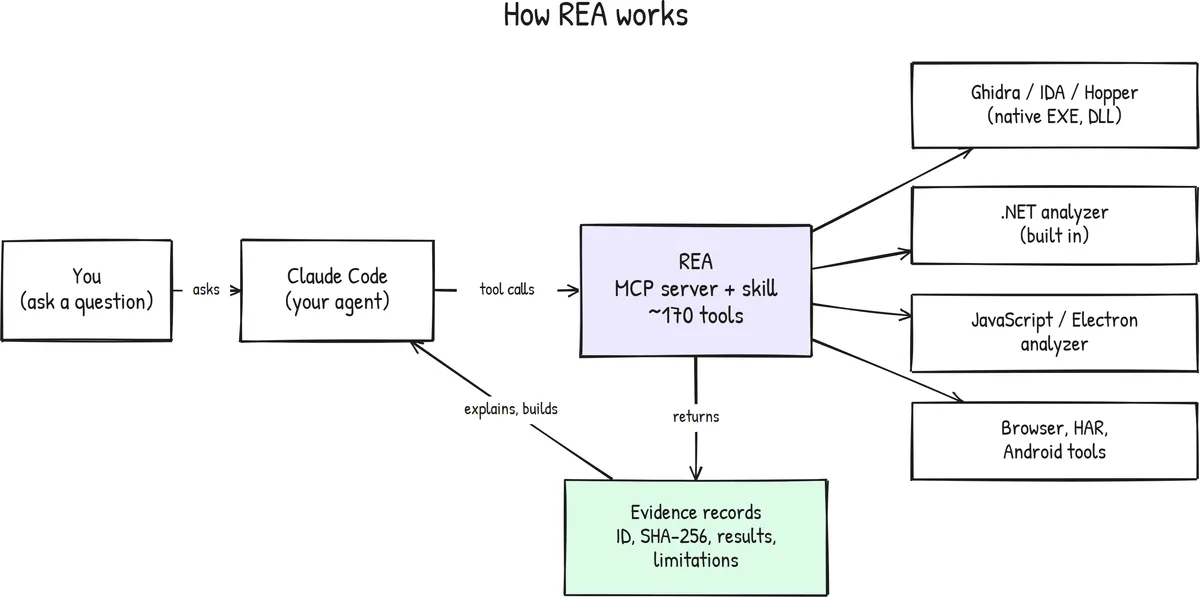
There are three parts to it:
- An MCP server. MCP (Model Context Protocol) is an open standard for giving AI agents new tools. Version 6.4.0 of REA exposes around 170 tools, such as
open_binary,search_stringsandprocedure_pseudo_code. My guide on building an MCP server in C# explains how these servers work. - A skill. REA installs a skill that teaches the agent a good workflow: start broad, collect evidence, separate what is observed from what is guessed, and only then build. I covered how skills work in my article on Claude Code skills.
- Analysis backends. For .NET and JavaScript, REA reads the files directly. For native code, it drives a real decompiler, which is Ghidra, IDA or Hopper.
Every tool call returns an evidence record with an ID, the SHA-256 hash of the analyzed file, the backend used, the results, and a list of limitations. I liked this part the most, because when the agent says a function launches another process, it can point to the record that shows the call.
This evidence is also what helps the agent build better. Without it, an agent that rebuilds a feature is mostly guessing from the app’s UI and from what it remembers about similar apps. With REA, the agent works from real facts about the binary, like which Windows APIs the feature calls, in what order, and what happens when a call fails. That gives it far better context, so the code it writes follows how the feature actually behaves instead of how it might behave. And because every claim points to a record, you can check the important ones before you build on them, which makes the result a lot more reliable.
How Did REA Go Viral?
REA looked like it appeared overnight, but the repository was created on 14 April 2026, and the first npm package shipped on 12 July 2026 as an automation layer for the Hopper disassembler. Since then, rea-agents has published 31 versions, up to 6.4.0 on 11 October 2026.
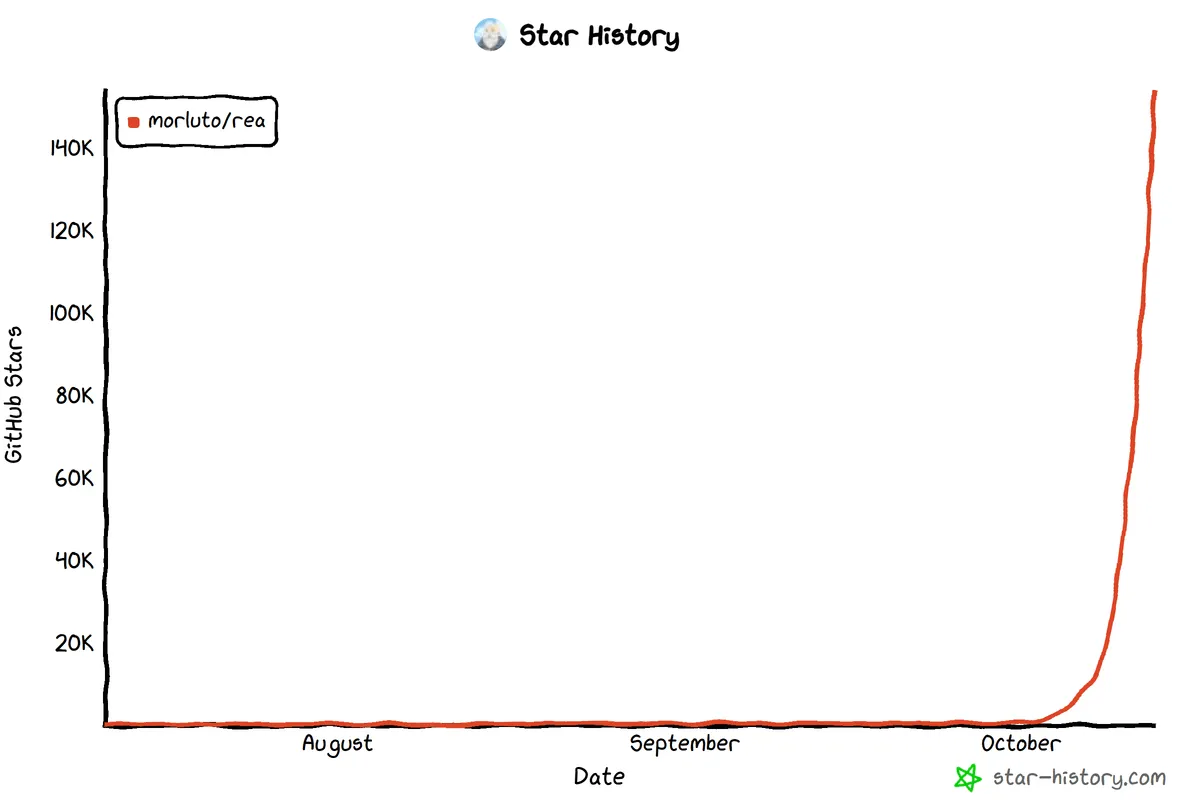
The chart above, from star-history.com, shows the jump in the first week of October, after large AI accounts on X started sharing it and one thread called the moment “Software is done”. By 9 October, it was the number one trending repository on GitHub, and when I checked on 13 October 2026, it had 192,024 stars and 46,722 forks.
I think it spread because every developer has wondered how some feature was built, and because many posts were really asking what a product is worth if anyone can rebuild its features in a day. I will come back to that question at the end.
Fake copies of REA, some offering “REA zip downloads”, appeared on GitHub. The only real sources are the
rea-agentspackage on npm and themorluto/rearepository, so please do not run anything else.
How Old Are the Reverse Engineering Tools Under REA?
Most of the viral posts left out that, for native apps, the heavy lifting in REA is done by tools that have existed for decades.
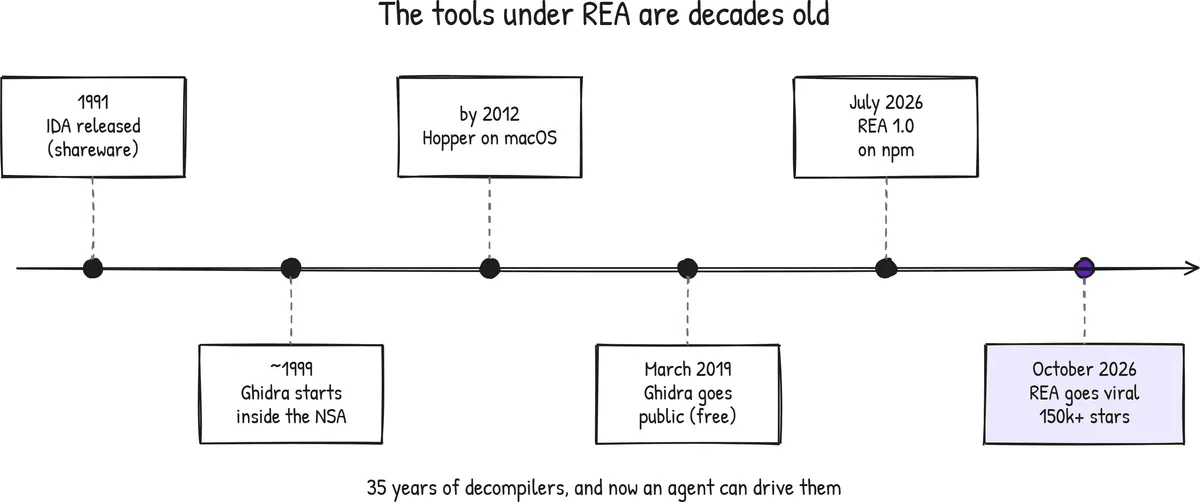
- IDA (the Interactive Disassembler) was first released on 21 May 1991 by Ilfak Guilfanov as shareware, which makes it 35 years old, and Hex-Rays has developed it since 2008.
- Ghidra was built inside the US National Security Agency, with comments in its source going back to 1999. The NSA released it to the public at the RSA Conference on 5 March 2019, and I used Ghidra 12.1.4 for this article.
- Hopper, by Vincent Bénony, has been a popular disassembler on macOS since at least 2012.
So turning machine code back into readable pseudocode has been possible for decades, and the new part is that an agent can drive these tools for you. Earlier, you needed to know which function to open, how to follow cross-references, and how to read decompiled C with no meaningful names. Now you ask a question in plain English, and the agent does the clicking and writes up what it found, which lowers the skill needed to use these tools by a lot.
Is It Legal to Reverse Engineer an App With REA?
Please read this section before you install anything. Reverse engineering commercial software that you do not have the rights to study is wrong, and it can get you into serious legal trouble. REA is a tool, just like a decompiler, but the target you choose decides whether you are learning or breaking the law. I am not a lawyer and this is not legal advice. Here is why it matters:
- License agreements. Most commercial apps ban reverse engineering in their terms. The first app I wanted to study was Wispr Flow, a dictation app I like, but section 3.A of its terms of service prohibits decompiling or reverse engineering it, so I dropped it.
- Copyright. Copying code, icons or text out of a decompiled binary is copyright infringement, even if you only meant to learn from it.
- Anti-circumvention laws. Bypassing license checks, DRM or encryption is a separate offense in many countries, for example under Section 1201 of the US DMCA.
- Narrow exceptions. Interoperability exceptions, such as section 1201(f) in the US and Article 6 of EU Directive 2009/24/EC, do not give you permission to clone a product.
These are the rules I followed:
- Only study permissively licensed software (MIT, Apache 2.0, BSD) or software you own.
- Use the official installed build, never a cracked or leaked one.
- Write your own implementation, and never paste decompiled code or copy assets into your project.
- Credit the original project, and use your own name and branding.
- Never bypass license checks, authentication or DRM, even on open source targets.
With these rules, I picked the Color Picker in Microsoft PowerToys, which is MIT licensed. Since its source code is public, I could also check every claim REA made against the real code.
How Do You Set Up REA on Windows?
Here are the exact steps I followed on Windows 11 with Node.js 24.13.1. You need Node.js 22.19+, 24.11+ or 26+ with npm, a coding agent, and, only for native C or C++ binaries, Ghidra 12.1.x with a 64-bit JDK 21 or later.
Step 1: Install the REA CLI Globally
Open up your terminal and install the CLI globally with npm.
npm install --global rea-agents@6.4.0rea --versionThe README also shows a quicker npx rea-agents setup command, but I would avoid it. When I dry-ran it, the MCP server was registered with a path inside the temporary npx cache, which can be cleaned up at any time and break the setup.
Step 2: Dry-Run the Setup, Then Apply It
REA changes your agent’s configuration, so it is a good habit to see the plan before applying it.
rea doctorrea setup --client claude_code --dry-runrea setup --client claude_code --yesrea doctor checks your machine, and the dry run showed me two actions: adding the REA server to ~/.claude.json, with a backup at ~/.claude.json.rea.backup, and installing the skill to ~/.claude/skills/reverse-engineer-anything. The --client claude_code flag limits the setup to Claude Code, and I explained what lives in these folders in the anatomy of the .claude folder.
Step 3: Install Ghidra for Native Binaries (Optional)
Skip this step if you only want to study .NET or JavaScript apps. For native DLLs and EXEs, install a JDK and Ghidra, and tell REA where they are.
winget install Microsoft.OpenJDK.21setx GHIDRA_INSTALL_DIR "C:\tools\ghidra_12.1.4_PUBLIC"setx JAVA_HOME "C:\Program Files\Microsoft\jdk-21.0.12.101-hotspot"setx REA_ANALYSIS_PROVIDER ghidraAfter this, open a new terminal and run rea setup --client claude_code --yes again, which is easy to miss. The second run writes GHIDRA_INSTALL_DIR and JAVA_HOME into the MCP registration, so REA can find Ghidra even when your agent was started without these variables.
Step 4: Restart Your Agent and Verify
The MCP tools only load when a session starts, so restart Claude Code, then run rea doctor and rea providers --json to confirm that Ghidra is detected. Native analysis on Windows is officially experimental, and 59 of the 170 tools were available in my setup, since many depend on macOS, Linux or Android tooling. Still, the .NET and JavaScript analysis and every native tool I needed worked without issues.
How I Built hexgrab With REA
hexgrab is a tiny Windows color picker: you press Win + Shift + H, point at any pixel, click, and the HEX code of that color is copied to your clipboard. It is built with .NET 10 and WPF, uses no NuGet packages, and has 741 lines of C#. The setup, the investigation and the first working build all happened on 12 October 2026.
What REA Found Inside the PowerToys Color Picker
The PowerToys Color Picker (version 0.98.0) ships as a .NET UI assembly, PowerToys.ColorPickerUI.dll, and a native C++ module, PowerToys.ColorPicker.dll. I asked Claude Code to use REA to work out how picking a color works end to end, and to show the evidence for every claim.
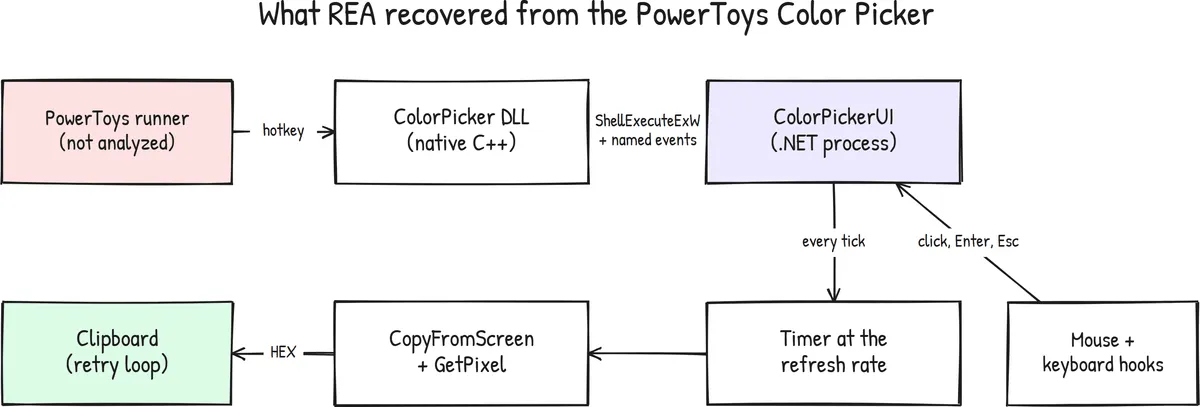
For the .NET side, inspect_managed_native_boundaries listed every Windows API the UI calls. For the native side, REA opened the DLL in Ghidra, searched for strings, followed the cross-references, and decompiled the functions that used them. It also found that low-level mouse and keyboard hooks swallow the click, Enter and Esc, so they never reach the app underneath.
How Accurate Was REA?
I compared every claim against the real source code at version 0.98.0. REA got 8 of the 9 claims fully right, and 1 partly right.
| What REA claimed | Verdict |
|---|---|
UI is launched with ShellExecuteExW and the module’s own process ID | Correct |
fMask is 0x440 (NOCLOSEPROCESS and FLAG_NO_UI) | Correct, exact value |
The UI executable is PowerToys.ColorPickerUI.exe | Correct |
| Named events show and terminate the UI | Correct |
| The native module registers the hotkey | Partly correct |
| A timer polls the pixel at the monitor’s refresh rate | Correct |
The pixel is read with CopyFromScreen and GetPixel | Correct |
| The clipboard write retries with a sleep | Correct, without the exact 10 tries of 10 ms |
The cursor is swapped through the registry and SPI_SETCURSORS | Correct |
The partial miss taught me something useful: the module handles the hotkey, but the PowerToys runner, a different executable, is what registers it, and REA never looked at the runner because I never gave it that file.
It did not go perfectly either, because the first string search landed inside a logging wrapper, and the real launcher only showed up one caller higher. Searching for ShellExecuteExW by name failed, because Ghidra names imports like SHELL32.DLL::ShellExecuteExW. The list of .NET members came back at 2.7 MB, far too much for an agent’s context, so I ran that command through the CLI and filtered it with a small script. My advanced Claude Code tips cover more ways to keep large outputs out of your context.
What I Kept and What I Left Out
I planned the build before writing code, the same way I described in my article on Claude Code plan mode. I kept two ideas from PowerToys and wrote my own code for both. The first is polling at the refresh rate, because listening only for mouse moves misses color changes under a still cursor, like a playing video. Here is how hexgrab reads the refresh rate of the primary display:
public static int GetPrimaryRefreshRate(){    var mode = new DEVMODEW { dmSize = 220 };    if (EnumDisplaySettingsW(null, ENUM_CURRENT_SETTINGS, ref mode) && mode.dmDisplayFrequency > 1)    {        return (int)mode.dmDisplayFrequency;    }
    return 60;}
The second is retrying the clipboard write, up to 10 times with a 10 ms pause (the same values PowerToys uses), because the clipboard is shared by every app on your machine and can be locked for a few milliseconds while another app has it open.
Some decisions were mine to make, starting with the overall design. PowerToys has a runner, a plugin module and a separate UI process because it hosts many utilities, but hexgrab is a single app, so one .NET process registers the hotkey with RegisterHotKey and owns the UI. I also chose not to copy the cursor swap. PowerToys changes the system cursor scheme while you pick, so if the app crashes mid-pick, your cursors stay changed, and for a small tool I did not think that risk was worth it. I also skipped NuGet packages and used LibraryImport for the Windows APIs, for the reasons I gave in stopping your AI agent from picking the wrong .NET libraries.
To test it, I wrote an end-to-end PowerShell script that opens a solid blue window and sends real hotkeys, clicks and keys to hexgrab. It checks that a click copies #3366CC and is swallowed, that Esc cancels, that Enter copies, that hooks are removed after a pick, and that a color change under a still cursor is picked up. All six checks pass on Windows 11 at 125% scaling.
Where REA Falls Short
Before you rely on REA, you should know its limits. It explains behavior and does not recover source code, so you still design and write the app yourself. It only knows about the files you give it, some outputs are too large for your agent’s context, and native analysis on Windows is experimental. It also changes quickly, so pin the version you use.
My take: REA is the best way I have seen to understand how a feature in an allowed app works, and the evidence records make it trustworthy enough to build on. Treat its findings like notes from a smart colleague and check the important ones.
Is Building Software Still the Moat?
A moat is whatever makes your product hard to copy. For a long time, the moat for a lot of software was simply that it was hard and expensive to build, and I think that is changing quickly.
It took me one day to study a Microsoft feature and rebuild its core. A color picker is small, but the cost of understanding and reproducing working software has clearly dropped, and it will keep dropping as agents get better. If your only advantage is that your code was hard to write, I don’t think it will last, but hexgrab also shows what did not get any cheaper.
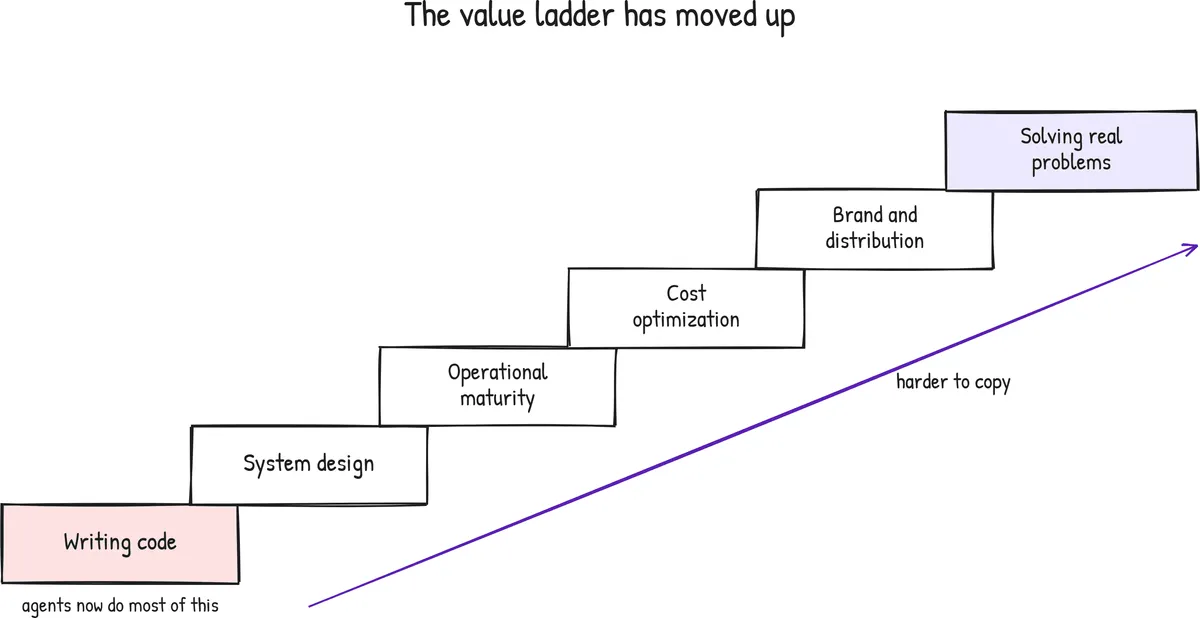
- System design experience. REA gave me facts, but dropping the runner and the separate UI process and leaving the user’s cursor scheme alone were design decisions that came from experience. I wrote about this kind of judgment in my 20 tips from a senior .NET developer.
- Operational maturity. PowerToys ships many utilities with an installer, automatic updates, a settings app, localization, accessibility support and regular releases from a full team, and hexgrab has none of that. Running software reliably for millions of people takes far more work than writing it.
- Cost optimization. Two apps with the same features can have very different cloud bills, database costs and AI token budgets, and the one that is cheaper to run wins over time.
- Brand and distribution. PowerToys comes from Microsoft, it is signed, and you trust it. My hexgrab exe triggers a Windows SmartScreen warning, because it is not code-signed and nobody knows me as a color picker vendor. That kind of trust comes from years of shipping reliable software, and no tool can copy it for you.
- Solving real problems. REA can tell you how a feature works, but it cannot tell you which feature people need. I only picked a color picker because I needed a legal target, and I am building the dictation app I really want separately, because it solves a problem I have every day.
Writing code is now the lowest step on this ladder, and agents can already do a lot of it for you. System design, operations, cost, trust and picking the right problem are where developers and products will differ from each other. I don’t see this as bad news, because these are the parts of our work that need real experience.
Key Takeaways
- REA is a free, MIT-licensed CLI and MCP server that lets agents like Claude Code study compiled apps.
- Only point REA at software you are allowed to study, and never copy decompiled code.
- On Windows, install the CLI globally and re-run setup after setting the Ghidra variables.
- REA got 8 of 9 claims about the PowerToys Color Picker right.
- Code is now the cheapest part of software, and the value has moved to system design, operations, cost, brand and solving real problems.
Frequently Asked Questions
What is REA (Reverse Engineer Anything)?
REA is a free, MIT-licensed command line tool and MCP server by the GitHub developer morluto. It gives AI coding agents like Claude Code, Codex and Cursor reverse engineering tools, so they can inspect compiled apps without source code and explain how a feature works with evidence.
Is it legal to use REA?
The tool is legal, but the target matters. Most commercial software bans reverse engineering in its license, and copying decompiled code is copyright infringement. Use REA only on permissively licensed open source software or on software you own. This is not legal advice.
Does REA work on Windows?
Yes. .NET and JavaScript analysis work fully on Windows. Native analysis needs Ghidra and is officially experimental, and 59 of the 170 tools in REA 6.4.0 were available on my Windows 11 machine.
Can REA clone an entire app?
No. REA explains how features work with evidence from the binary, but it does not recover the original source code or produce a working copy of an app. You still design and write your own implementation.
Is REA free?
Yes, REA is open source under the MIT license. You still pay for the AI agent and model you use with it, since every tool call uses tokens.
How do I know I am installing the real REA?
Install it only from the rea-agents package on npm or the morluto/rea repository on GitHub. Several fake repositories offering zip downloads appeared after REA went viral, and you should not run those.
Summary
In this article, I covered what REA is, how it works, how to set it up on Windows, and how I used it to rebuild the core of the PowerToys Color Picker as hexgrab in .NET 10. You can find the source code and the full REA findings in the hexgrab repository.
What are your opinions about this? Let me know in the comments below.
Happy Coding :)



What's your take?
Push back, share a war story, or ask the obvious question someone else is wondering. I read every comment.